
The Username field lets customers choose the username they will use to identify and access their WordPress account. Each registered customer must have a unique username.
Select the Username field in the registration form preview to open its settings.
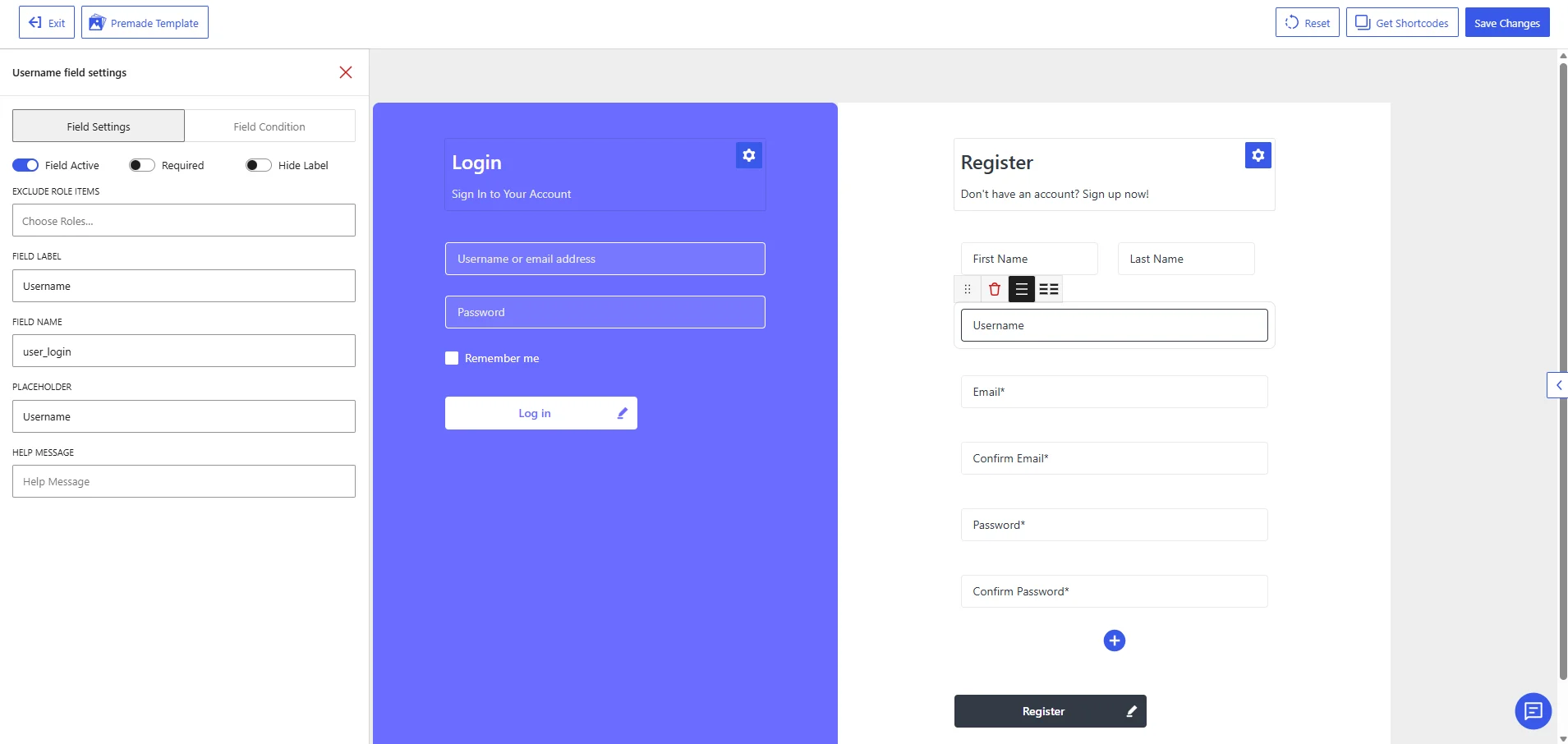
Username field settings in the WholesaleX Registration Form Builder.
Available Field Settings
Field Active
Enable Field Active to display the Username field on the registration form.
Disable it only when your registration process generates usernames automatically or uses another value, such as the customer’s email address, as the username.
Before disabling this field, confirm that your website has another method for creating the required WordPress username.
Required
Enable Required to prevent customers from submitting the registration form without entering a username.
The Username field should normally remain required because WordPress needs a username to create the customer account.
Hide Label
Enable Hide Label to remove the visible Username label from the registration form.
The placeholder will remain visible until the customer starts typing. Keeping the label visible is generally recommended because it clearly identifies the account credential being requested.
Exclude Role Items
Use Exclude Role Items to hide the Username field from selected user roles.
Click Choose Roles and select the roles that should not see the field. Leave the setting empty to display it for all applicable users.
Avoid excluding this field unless usernames are generated automatically for those roles. Every WordPress user account still requires an internal username.
Field Label
The Field Label controls the text displayed for the field on the registration form.
The default value is:
Username
You can change it to another clear label, such as:
Account UsernameChoose a UsernameLogin Username
The label should make it clear that customers may use this value when signing in to their accounts.
Field Name
The Field Name is the internal identifier WordPress uses to process and store the username.
The default value is:
user_login
Keep this value unchanged. WordPress uses user_login as the standard field for account usernames.
Changing it may prevent the submitted username from being assigned correctly or cause account-registration errors.
Placeholder
The Placeholder appears inside the field before the customer enters a username.
The default value is:
Username
You can make it more instructional, such as:
Choose a username
or:
Enter your account username
Keep the placeholder brief and avoid placing important requirements only in the placeholder, since it disappears when the customer starts typing.
Help Message
Use Help Message to provide additional instructions about choosing a username.
Examples:
Choose a unique username for signing in to your account.
Your username must be different from existing customer usernames.
Choose carefully, as your username may not be easy to change later.
A help message is useful when you want to explain username requirements or distinguish the username from the customer’s email address.
Recommended Configuration
| Setting | Recommended value |
|---|---|
| Field Active | Enabled |
| Required | Enabled |
| Hide Label | Disabled |
| Exclude Role Items | None |
| Field Label | Username |
| Field Name | user_login |
| Placeholder | Choose a username |
| Help Message | Choose a unique username for signing in to your account. |
After configuring the field, click Save Changes. Test the frontend registration form to confirm that customers cannot register with an empty or already-used username.