
The User Bio field allows customers to provide a short description about themselves, their role, or their business during registration. Since it uses a multi-line input area, customers can enter more detailed information than they can in a standard Text field.
Select the User Bio field in the registration form preview to open its settings.
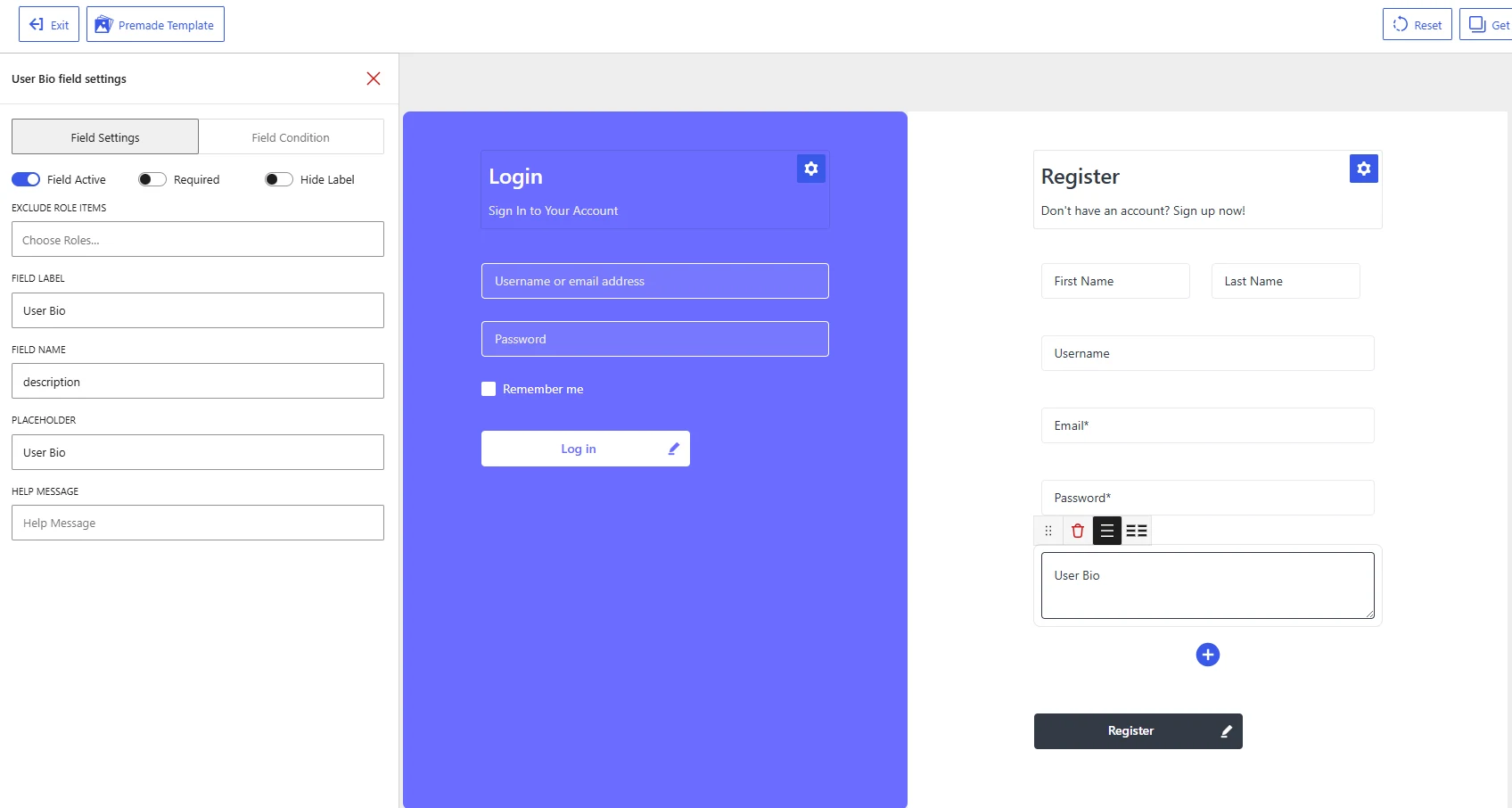
User Bio field settings in the WholesaleX Registration Form Builder.
Available Field Settings
Field Active
Enable Field Active to display the User Bio field on the registration form.
Disable it to keep the field in the form builder without showing it on the published registration form.
Required
Enable Required when customers must provide a bio before submitting the registration form.
Leave it disabled when the information is optional. In most registration forms, the User Bio field can remain optional unless the description is needed for reviewing wholesale applications.
Hide Label
Enable Hide Label to remove the visible User Bio label from the registration form.
The placeholder will remain visible inside the input area until the customer starts typing. Keep the label visible when customers need clear context about what information they should provide.
Exclude Role Items
Use Exclude Role Items to hide the User Bio field from selected user roles.
Click Choose Roles and select the roles that should not see the field. Leave the setting empty to display it for all applicable users.
For example, you can request a business introduction from wholesale applicants while excluding the field from regular customer roles.
Field Label
The Field Label identifies the information customers should enter.
The default value is:
User Bio
You can change it to match the purpose of the field, such as:
About Your BusinessBusiness IntroductionProfessional BioTell Us About Your Company
Use a specific label so customers know whether they should describe themselves, their position, or their business.
Field Name
The Field Name is the internal identifier used to store the submitted information.
The default value is:
description
Keep this value unchanged to save the submitted text in the standard WordPress user description field. Changing it may prevent the information from appearing in the expected user profile location or affect integrations that use the WordPress bio data.
Placeholder
The Placeholder appears inside the input area before the customer enters any text.
The default value is:
User Bio
You can replace it with a more descriptive instruction, such as:
Tell us briefly about yourselfDescribe your business and the products you sellProvide a short introduction to your company
Keep the placeholder brief. Use the Help Message when more detailed instructions are necessary.
Help Message
Use Help Message to explain what information customers should include in their bio.
Examples:
Briefly describe your business, products, and target customers.
Tell us about your role and your reason for applying for a wholesale account.
Provide a short introduction that will help us review your application.
A clear help message can improve the quality and consistency of the information submitted by applicants.
Recommended Configuration
| Setting | Recommended value |
|---|---|
| Field Active | Enabled when a customer description is needed |
| Required | Based on your account-review process |
| Hide Label | Disabled |
| Exclude Role Items | Exclude roles that do not need this field |
| Field Label | About Your Business |
| Field Name | description |
| Placeholder | Briefly describe your business |
| Help Message | Describe your business, products, and target customers. |
After configuring the User Bio field, click Save Changes and check the registration form on the frontend. Confirm that the field provides enough space for longer responses and that the submitted information is saved correctly.