
The Display Name and Nickname fields collect names associated with a customer’s WordPress profile.
The Display Name controls how the customer’s name may appear publicly across the website. The Nickname stores an alternative name in the customer’s WordPress profile and may also be used as a display-name option.
Select either field in the registration form preview to open its settings.
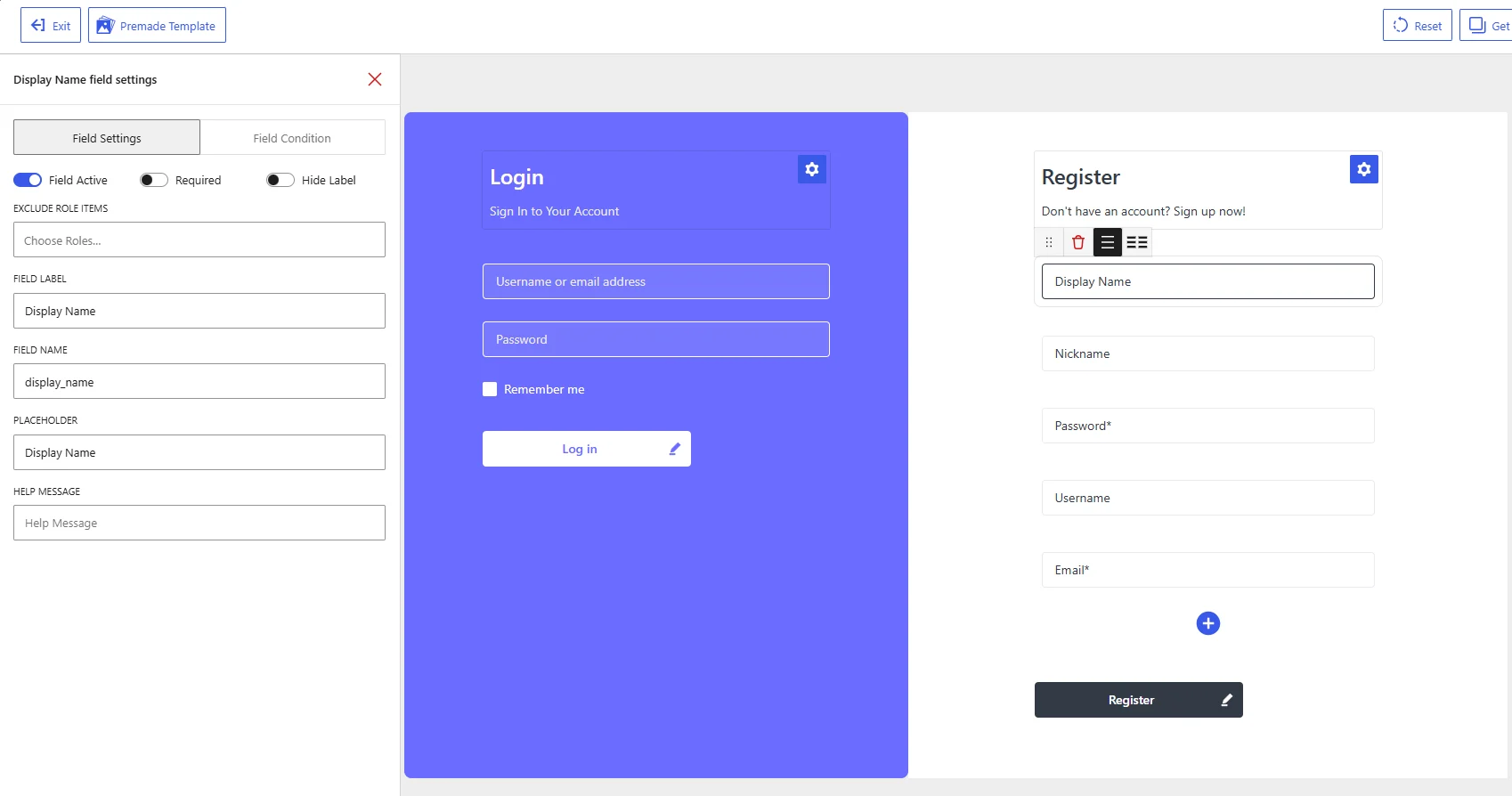
Display Name field settings in the WholesaleX Registration Form Builder.
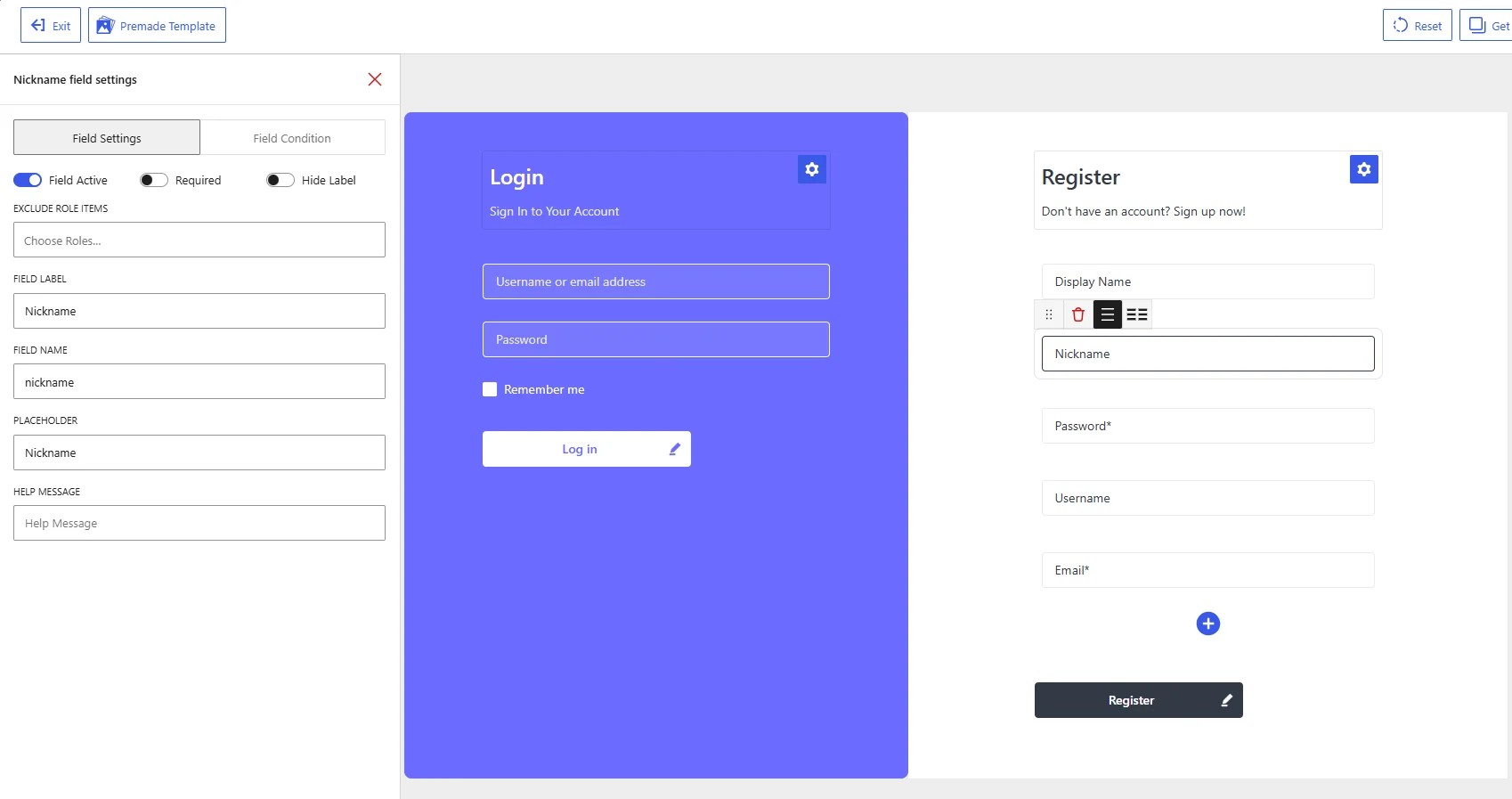
Nickname field settings in the WholesaleX Registration Form Builder.
Difference Between Display Name and Nickname
Although both fields collect name-related information, they serve different purposes:
| Field | Purpose |
|---|---|
| Display Name | Defines the name that may be shown publicly for the customer |
| Nickname | Stores an alternative or informal name in the WordPress user profile |
For example, a customer named Jonathan Smith could use Jonathan Smith as the display name and Jon as the nickname.
Available Field Settings
Field Active
Enable Field Active to display the selected field on the registration form.
Disable it to keep the field in the form builder without showing it on the published form.
Neither field is always necessary during wholesale registration. Enable them only when you want customers to specify how their names should be stored or displayed.
Required
Enable Required when customers must complete the field before submitting the registration form.
Leave it disabled when the information should remain optional. The Nickname field is generally optional, while the Display Name field may be required when your website publicly displays customer names.
Hide Label
Enable Hide Label to remove the visible field label from the registration form.
The placeholder will remain visible until the customer starts typing. Keep the label visible when customers may not understand the difference between a display name and a nickname.
Exclude Role Items
Use Exclude Role Items to hide the selected field from specific user roles.
Click Choose Roles and select the roles that should not see the field. Leave the setting empty to display it for all applicable users.
For example, you can collect a Display Name from customer roles that participate in community features while excluding it from roles that only use the website for ordering.
Field Label
The Field Label controls the name displayed for the field on the registration form.
The default labels are:
| Field | Default label |
|---|---|
| Display Name | Display Name |
| Nickname | Nickname |
You can change them to more descriptive labels, such as:
Public Display NameName Shown on Your ProfilePreferred NicknameAlternative Name
Use wording that clearly distinguishes the customer’s public display name from an informal nickname.
Field Name
The Field Name is the internal WordPress identifier used to store the submitted information.
The default values are:
| Field | Default field name |
|---|---|
| Display Name | display_name |
| Nickname | nickname |
Keep these values unchanged.
WordPress uses display_name and nickname as standard user-profile fields. Changing either value may prevent the submitted information from being stored in the correct profile field or working properly with themes, plugins, and other integrations.
Placeholder
The Placeholder appears inside the field before the customer enters a value.
The default placeholders are:
| Field | Default placeholder |
|---|---|
| Display Name | Display Name |
| Nickname | Nickname |
You can replace them with more instructional text:
Enter the name to display publiclyEnter your preferred nickname
Keep the placeholder brief and use the Help Message when the field requires further explanation.
Help Message
Use Help Message to explain what customers should enter.
For the Display Name field:
Enter the name you want to display publicly on your account.
For the Nickname field:
Enter an alternative or informal name for your profile.
A help message is useful because customers may not immediately understand the difference between these two fields.
Recommended Configuration
| Setting | Display Name | Nickname |
|---|---|---|
| Field Active | Enable when needed | Enable when needed |
| Required | Based on your profile requirements | Usually disabled |
| Hide Label | Disabled | Disabled |
| Exclude Role Items | Select roles if needed | Select roles if needed |
| Field Label | Display Name | Nickname |
| Field Name | display_name | nickname |
| Placeholder | Enter your display name | Enter your nickname |
| Help Message | Explain where the name may appear | Explain that it is an alternative name |
After configuring both fields, click Save Changes and test the registration form on the frontend. Confirm that the submitted values are saved in the corresponding WordPress user-profile fields.