
WholesaleX 3.0.0 introduces a redesigned workflow for managing wholesale pricing and store configurations.
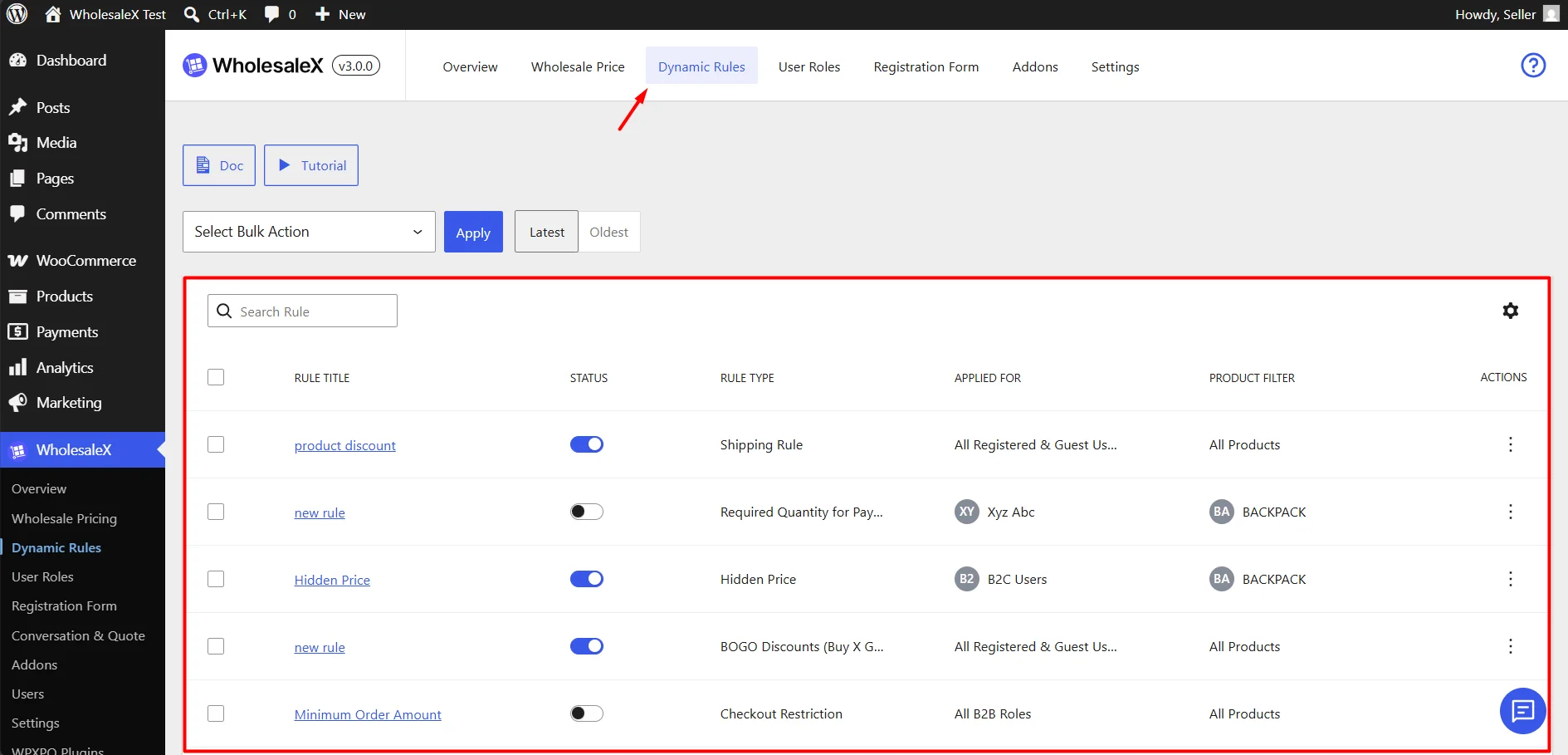
If you are upgrading from an earlier version, your existing Dynamic Rules will remain available in the legacy Dynamic Rules section during the migration period. This allows you to review your existing configurations and recreate them using the new workflow.
What Happens After Updating?
After updating to WholesaleX 3.0.0:
- Your existing Dynamic Rules will continue to work.
- Existing rules can still be viewed from the legacy Dynamic Rules section.
- New Dynamic Rules cannot be created from the legacy interface.
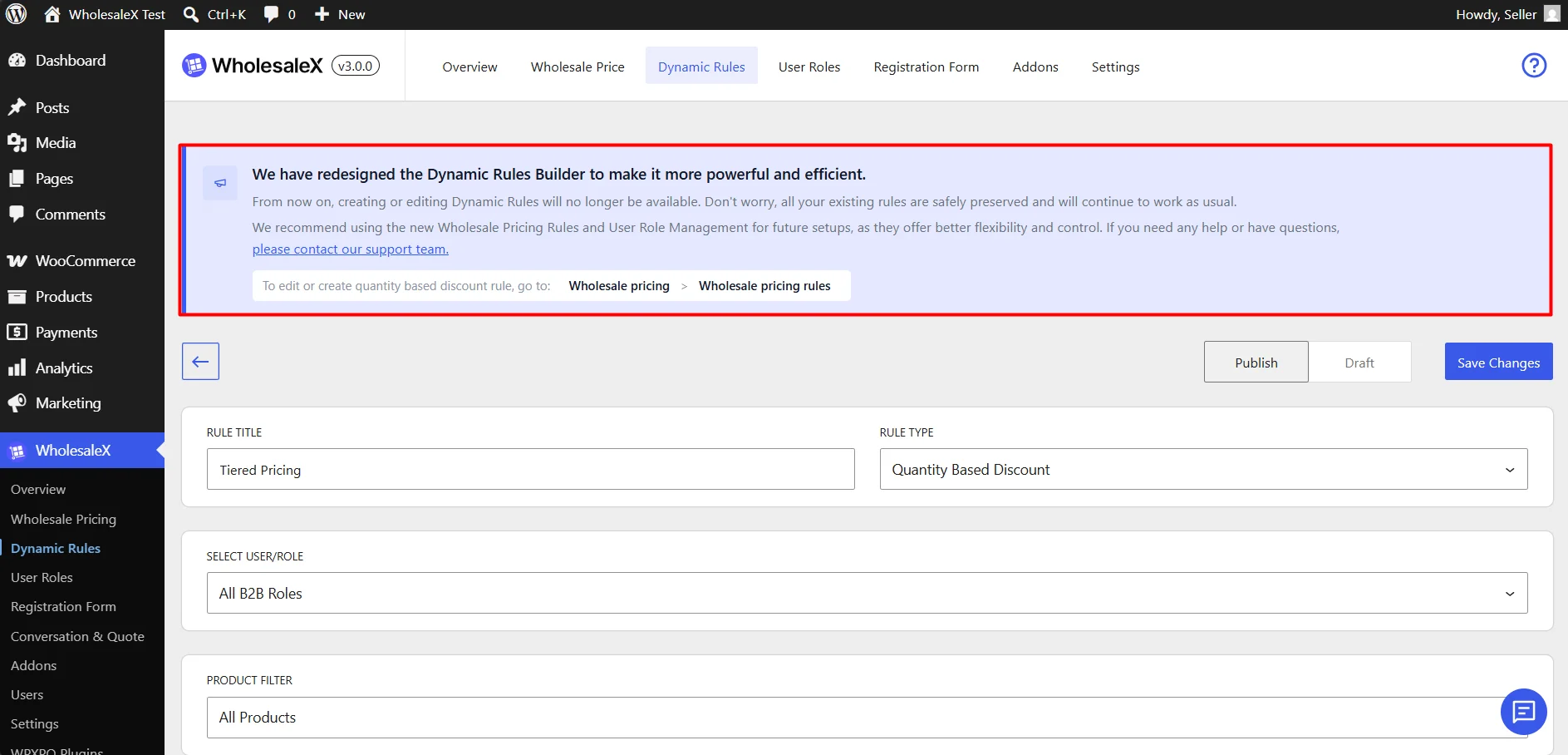
- When editing a legacy rule, the editor will display a notice showing the new location for that specific rule type and guide you through recreating it using the new workflow.
- All new configurations should be created using the new WholesaleX workflow.
- The legacy Dynamic Rules section will be removed in a future release.
We recommend migrating your existing rules as soon as possible.
How to Migrate Existing Rules
- Open the legacy Dynamic Rules section.
- Review the rule you want to migrate.
- Note the conditions, discounts, user roles, and other settings used by the rule.
- Follow the migration guidance displayed in the editor.
- Recreate the rule in its new location.
- Test the new rule to confirm it works as expected.
- Delete the legacy rule once the new configuration is verified.
Finding the New Location for Your Rules
When viewing or editing a legacy Dynamic Rule, WholesaleX will display a migration notice explaining where that rule type has moved in Version 3.0.0.
The guidance updates automatically based on the selected rule type and provides direct instructions for recreating the configuration in the new workflow.
Migration Mapping
| Legacy Rule Type | New Location |
|---|---|
| Product Discount | Wholesale Price > Product Discount |
| Cart Discount | Wholesale Price > Cart Discount |
| Payment Method Discount | User Roles > General Settings |
| Required Quantity for Payment Method | User Roles > General Settings |
| BOGO Discount | Wholesale Price > Buy X Get 1 Discounted |
| Shipping Rule | User Roles > General Settings |
| Minimum Order Quantity | Wholesale Price > Wholesale Pricing |
| Tax Rule | User Roles > Role Restrictions |
| Checkout Restriction | User Roles > Role Restrictions |
| Quantity-Based Discount | Wholesale Price > Wholesale Pricing |
| Extra Charge | User Roles > General Settings |
| BXGY Free | Wholesale Price > Buy X Get Y |
| Maximum Order Quantity | Wholesale Price > Wholesale Pricing |
| Restrict Product Visibility | User Roles > Role Restrictions |
| Hidden Price | User Roles > Role Restrictions |
| Non Purchasable | User Roles > Role Restrictions |
🚨 Important Notes
- Do not delete legacy rules until the replacement rule has been fully tested.
- New rules should always be created from the new interface.
- The legacy Dynamic Rules section is provided only for migration purposes.
- Future versions of WholesaleX will remove the legacy interface.
Need Help?
Need help migrating a specific rule? Contact our support team for assistance: https://www.wpxpo.com/contact/