
Managing a WooCommerce wholesale store should not require store owners to piece together pricing, quantity rules, customer restrictions, payment conditions, and product visibility across multiple screens.
That is where WholesaleX 3.0 takes a different approach.
Compared with the more distributed workflows of B2BKing and Wholesale Suite, the new version brings related settings into clearer, more contextual areas. Pricing strategies, purchase requirements, customer targeting, role policies, and customer previews are easier to configure as parts of the same wholesale system.
But a simpler workflow only matters if it can still handle complex business requirements. Rather than comparing features in isolation, we will examine practical wholesale scenarios and see how WholesaleX 3.0 handles them with fewer disconnected management areas than B2BKing and Wholesale Suite.
What Makes Wholesale Store Management Complex in WooCommerce?
Wholesale stores rarely operate with one discount for every customer. Retailers, distributors, dealers, and individual buyers may each need different prices, purchase requirements, payment options, and product access.
The challenge is not creating one rule. It is keeping the complete business policy clear as those requirements grow.
- One policy can require several separate setups: Configuring pricing, tier discounts, shipping, and product access for one role often forces store owners to jump across multiple separate rule screens.
- Complexity multiplies as stores scale: Managing growing catalogs, custom role tiers, regional rules, and seasonal deals quickly becomes fragmented and hard to maintain.
- More features don’t mean a better workflow: A long list of features is unhelpful if related conditions cannot be configured, reviewed, or tested from a unified interface.
WholesaleX 3.0 addresses this management problem by grouping pricing decisions inside Wholesale Pricing and customer-level policies inside User Roles.
How WholesaleX 3.0 Reorganizes Wholesale Management
WholesaleX 3.0 changes the traditional approach to organizing and managing wholesale operations.
Instead of placing most conditions inside one broad rule system, the new version moves related settings into the areas where users naturally expect to find them.
We covered the complete update in our WholesaleX 3.0 announcement. For this comparison, four workflow changes matter most:
- Wholesale Pricing manages the commercial offer: Store owners can create wholesale pricing, product discounts, cart discounts, and promotional offers while keeping product targeting, customer targeting, purchase requirements, tiered discounts, scheduling, and presentation within the same configuration.
- User Roles manage the customer experience: Payment methods, shipping methods, visibility controls, checkout restrictions, tax policies, and purchasing permissions are managed inside the role they affect.
This makes it easier to review how a specific customer group can browse, buy, pay, and receive orders.
- Settings follow the object being managed: Pricing decisions stay with pricing configurations, customer policies stay with roles, registration settings stay with the form builder, and private-store controls stay with store access. Users spend less time moving between unrelated screens to complete one task.
- Store owners can preview prices as customers: The View as Customer option shows how a selected product appears for a specific role or individual customer. Administrators can verify the applied price, discount, quantity requirements, and other customer-facing details without repeatedly switching accounts or testing the storefront manually.
Together, these changes replace a rule-first workflow with a more contextual management structure. The following sections show how that structure reduces configuration fragmentation compared with traditional WooCommerce wholesale workflows.
WholesaleX 3.0 Compared with Traditional Wholesale Plugin Workflows
Traditional wholesale workflows often distribute related settings across dynamic rules, product pages, categories, customer groups, user profiles, and global settings.
WholesaleX 3.0 reorganizes those tasks around the two areas store owners actually manage: commercial offers and customer policies.
| Management Task | Traditional Solution | WholesaleX 3.0 Workflow | Practical Benefit |
| Create wholesale offer | Scattered across rules, product settings, and categories | Configured inside one Wholesale Pricing setup | Faster offer creation and easier review |
| Quantity & order limits | Managed via separate rule or setting screens | Added directly to the core pricing configuration | Keeps offer and eligibility rules unified |
| Tiered discounts | Requires separate rules or product-level settings | Configured alongside base pricing and limits | Full discount progression visible in one place |
| Customer targeting | Split across groups, user profiles, and product settings | Targets roles or individual buyers in the same flow | Simplifies role and negotiated buyer pricing |
| Payment & shipping | Managed in isolated global or gateway menus | Configured directly inside the target User Role | Audits role conditions without screen jumping |
| Product visibility | Set via separate restriction rules or product pages | Grouped directly inside the relevant User Role | Clearer catalog and pricing access control |
| Checkout & tax rules | Maintained via separate dynamic rules or global settings | Attached directly to customer roles | Centralizes tax and checkout restrictions |
| Policy review | Requires mentally connecting scattered rules | Summarizes pricing and role policies together | Easy policy audits and team handoffs |
| Verify results | Requires test accounts, role switching, or incognito browsers | Uses built-in “View as Customer” preview | Instantly tests frontend view before publishing |
B2BKing and Wholesale Suite support many advanced wholesale requirements, but their workflows continue to rely more heavily on settings distributed across rules, products, groups, users, and global configuration areas.
WholesaleX 3.0 keeps comparable capabilities while reducing that management fragmentation. The following sections show how this works when creating a complete pricing strategy and managing the policies of each customer role.
Build Complete Pricing Strategies from One Configuration
Suppose a store owner wants to give Distributor customers 15% wholesale pricing on selected products, require a minimum purchase of 20 units, offer higher discounts at larger quantities, and run the offer for a limited period.
With WholesaleX 3.0, the store owner builds the full strategy inside one Wholesale Pricing configuration.
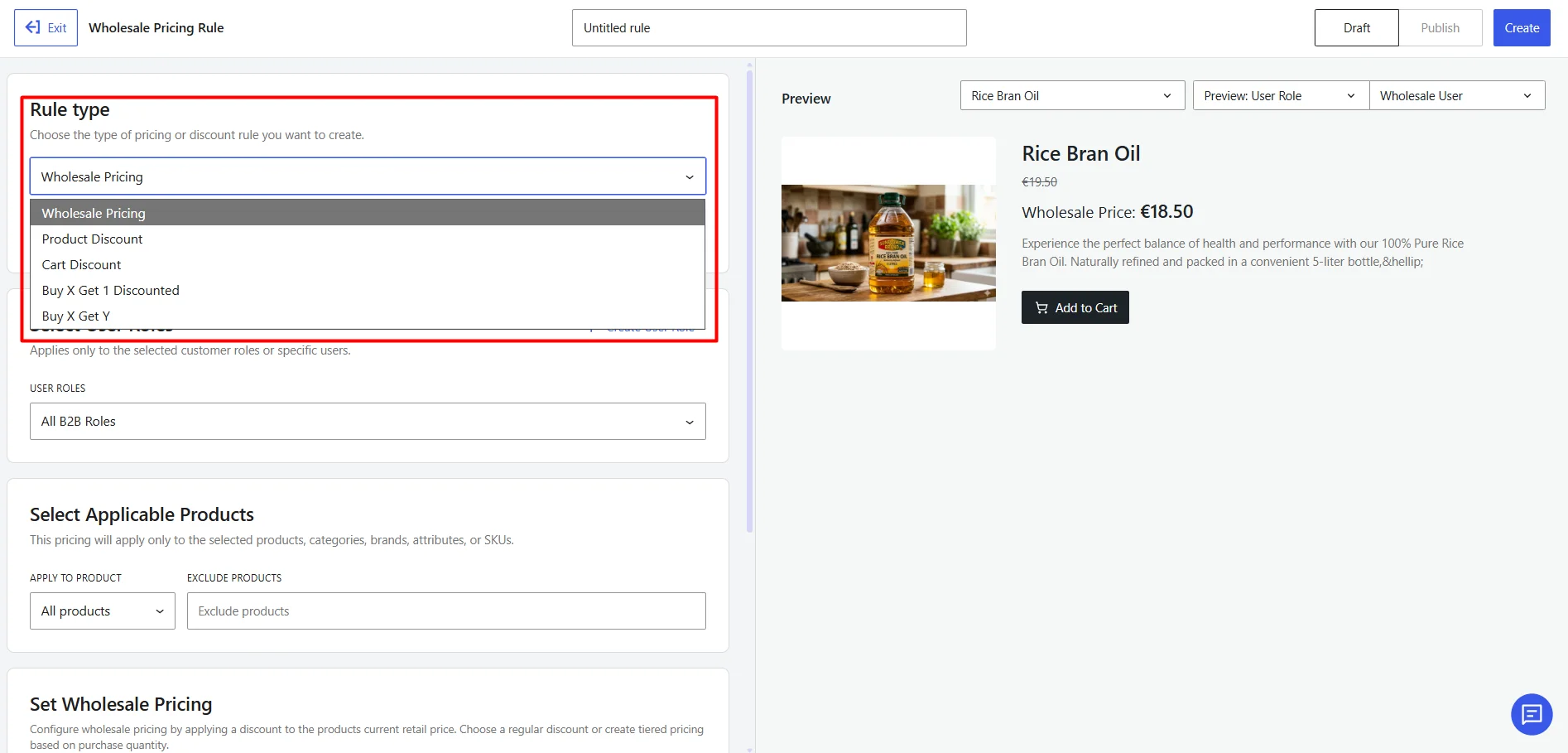
Choose the Pricing Strategy
The store owner starts by selecting the type of offer:
- Wholesale Pricing
- Product Discount
- Cart Discount
- Buy X Get Y Free
- Buy X Get One at a Discount
For this scenario, the store owner selects Wholesale Pricing and sets the base discount for Distributor customers.
Target Products, Roles, and Individual Customers
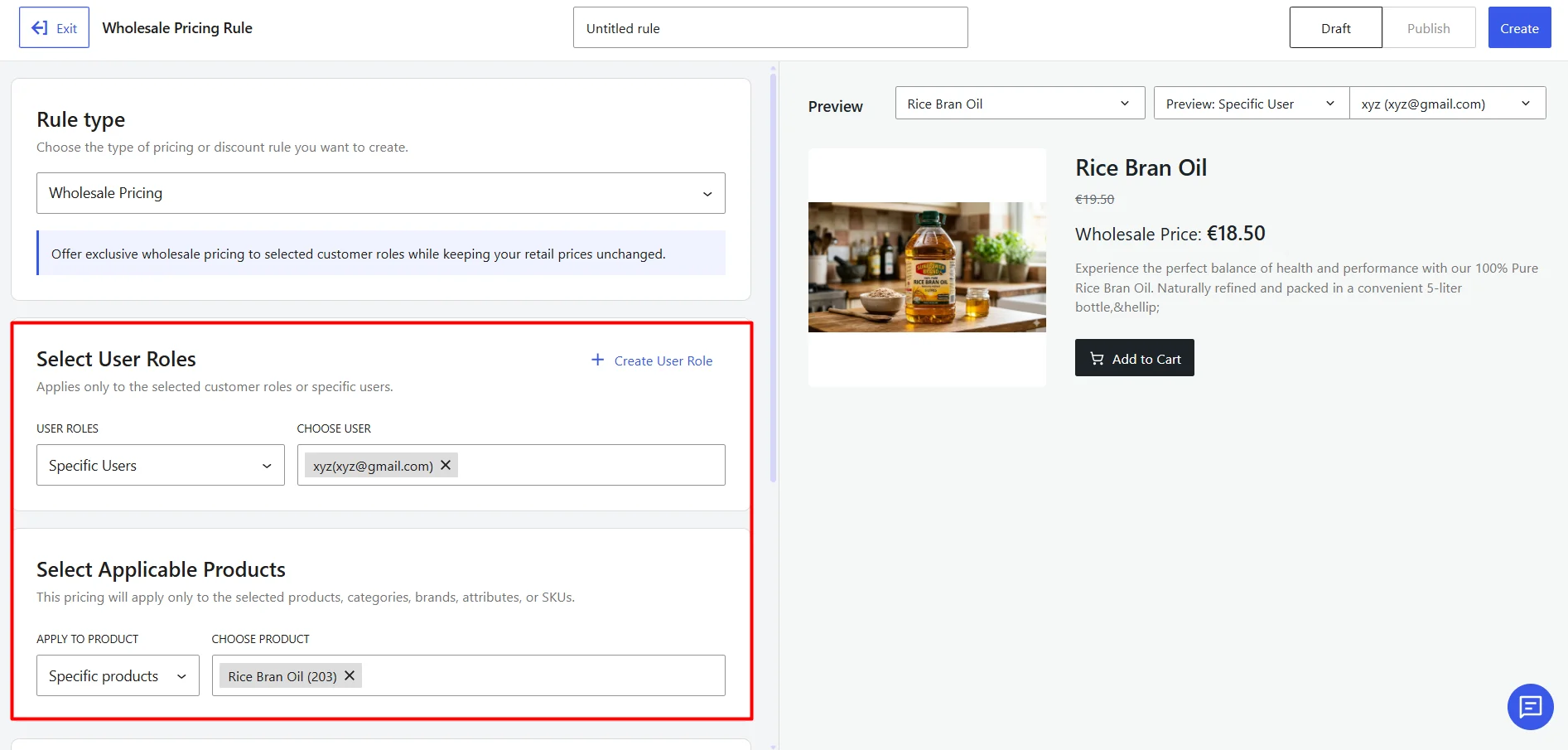
Next, the store owner selects which products are included in the offer and who can access it.
The pricing can be applied to:
- Selected products or product groups
- One or more customer roles
- Individual customers with negotiated pricing
This keeps product targeting and customer targeting inside the same pricing setup.
Add Purchasing Requirements Without Separate Rules
The store owner then defines the conditions required to qualify for the offer, including:
- Minimum and maximum quantities
- Quantity steps
- Minimum and maximum order values
- Tiered discounts
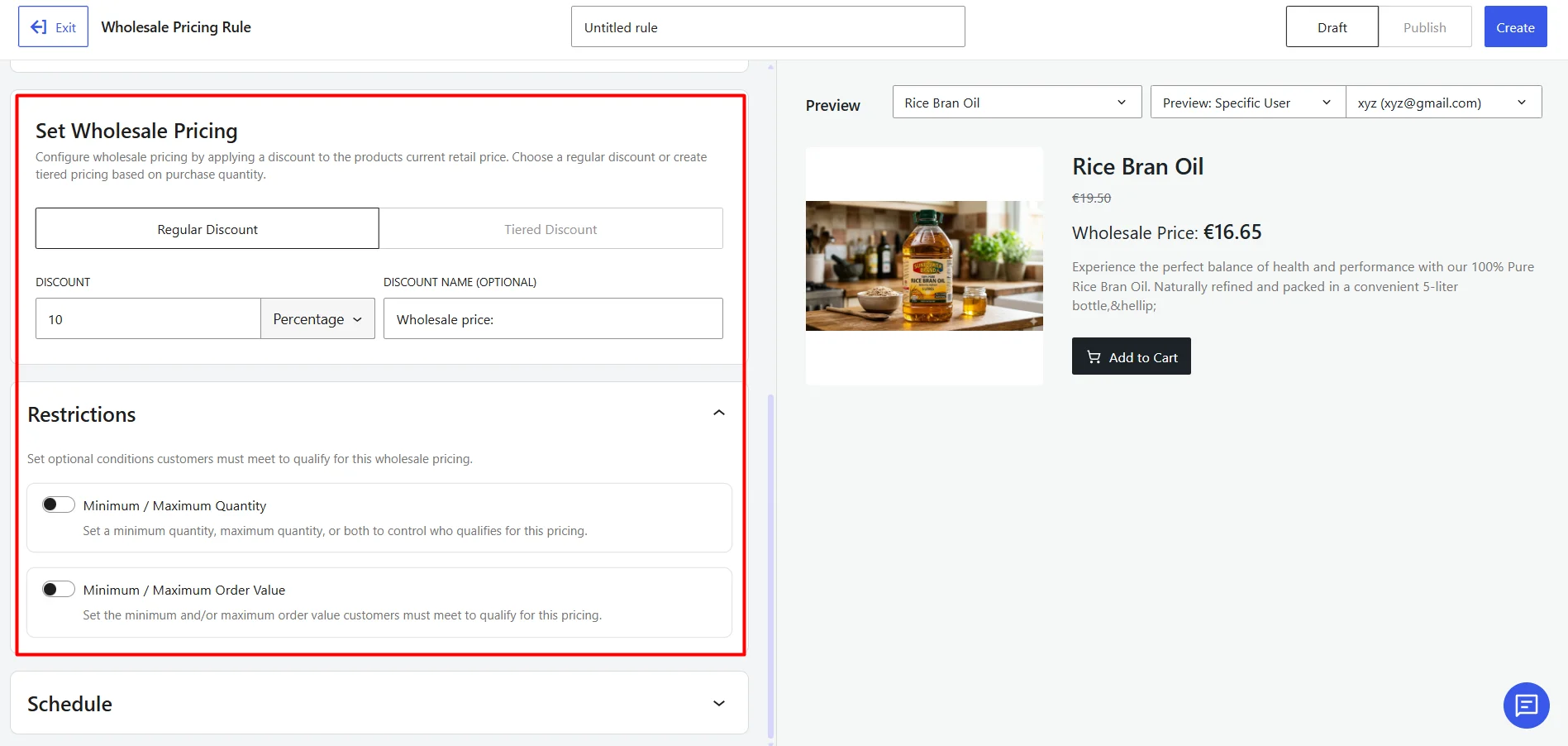
For example, the store owner can set 15% off from 20 units, 20% off from 50 units, and 25% off from 100 units for Distributor customers.
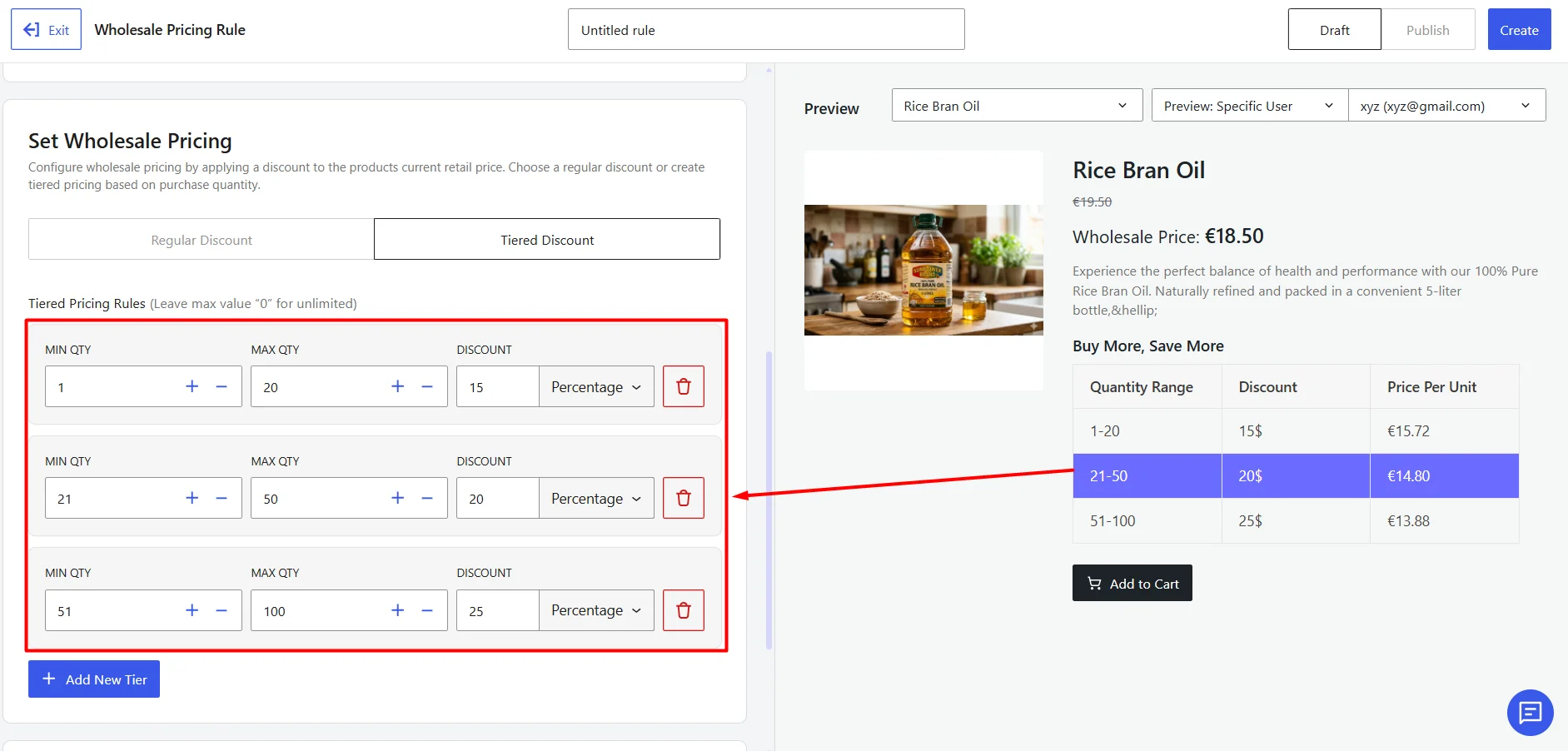
All pricing tiers and purchase conditions stay within the same configuration.
Schedule and Present the Offer
The store owner sets the start and end date for the offer. They can also configure:
- Pricing table display
- Promotional messages
- Quantity or order-value notices
- Validation messages
This ensures customers clearly understand the offer while it is active.
Preview the Complete Pricing Configuration from Customer Perspective
Before publishing, the store owner can then preview the result for a selected product, customer role, or individual buyer.
In B2BKing or Wholesale Suite, the same setup often requires switching between multiple rule screens and settings. WholesaleX 3.0 keeps everything in one pricing configuration.
Manage Customer Policies Directly from User Roles
Suppose the Distributor role should use bank transfer and freight shipping, receive a payment discount, access selected products, and follow different checkout and tax conditions.
WholesaleX 3.0 keeps these customer policies inside the Distributor role instead of requiring separate rules for each condition.
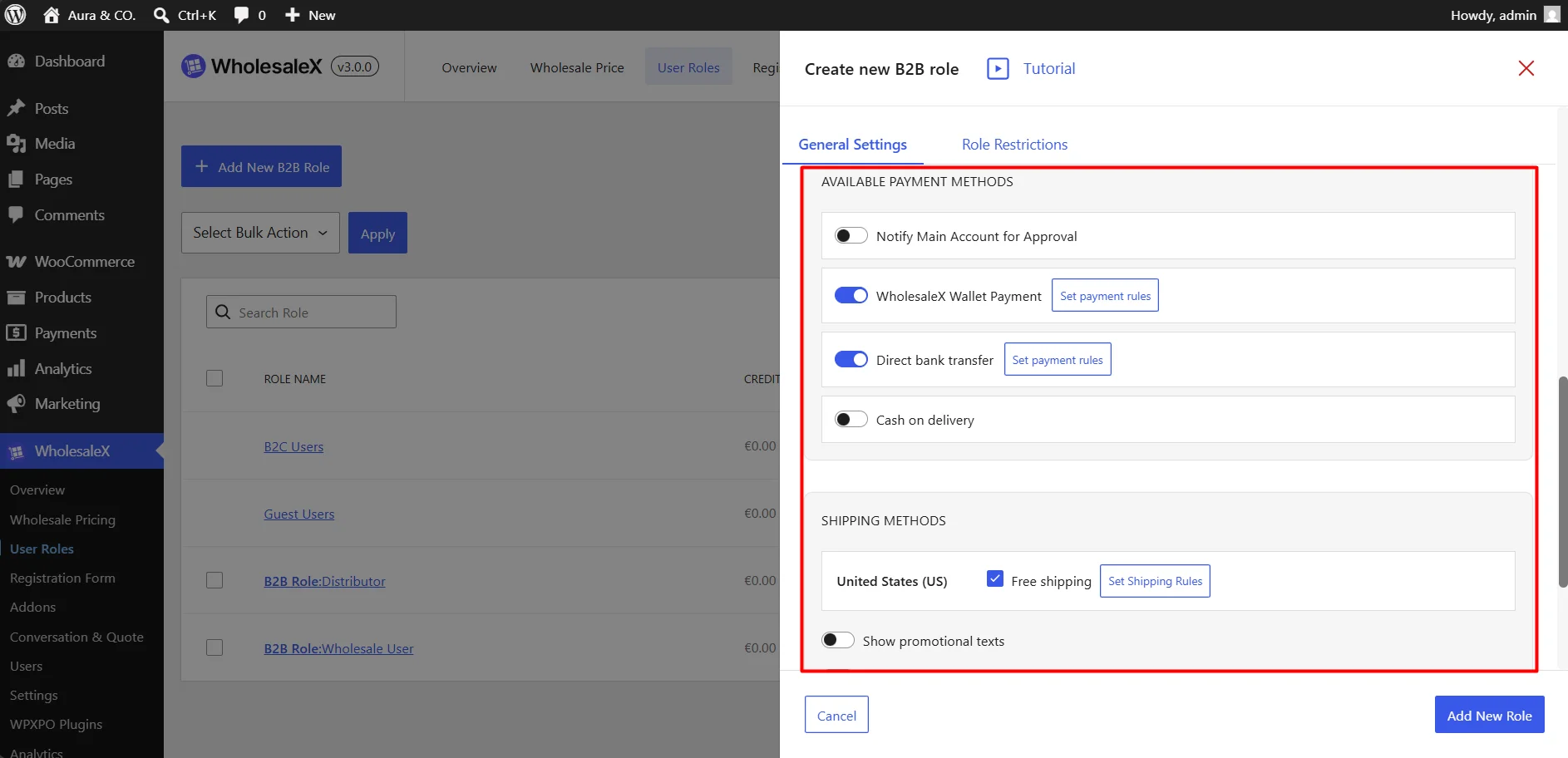
Control Available Payment and Shipping Methods
The store owner can select which payment and shipping methods are available to the role and configure related discounts, charges, or promotional messages.
This keeps payment and delivery policies attached to the customer group they affect.
Control What Each Customer Group Can See and Purchase
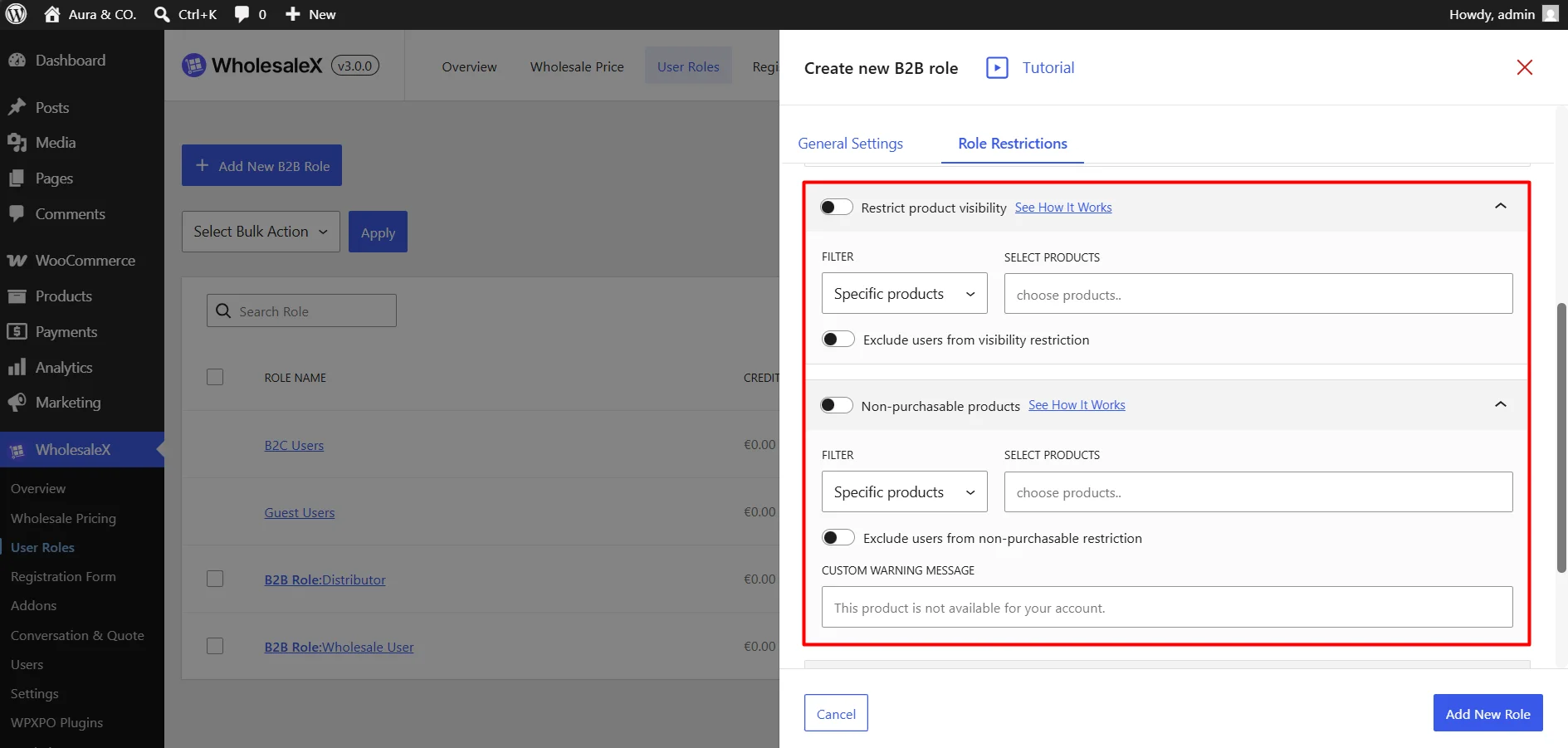
Inside the role, the store owner can configure:
- Product and price visibility restrictions
- Non-purchasable products
- Role-specific catalog access
This makes it easier to understand which products a customer group can see, whether prices are visible, and what they are allowed to purchase.
Apply Checkout, Tax, and Purchasing Policies by Role
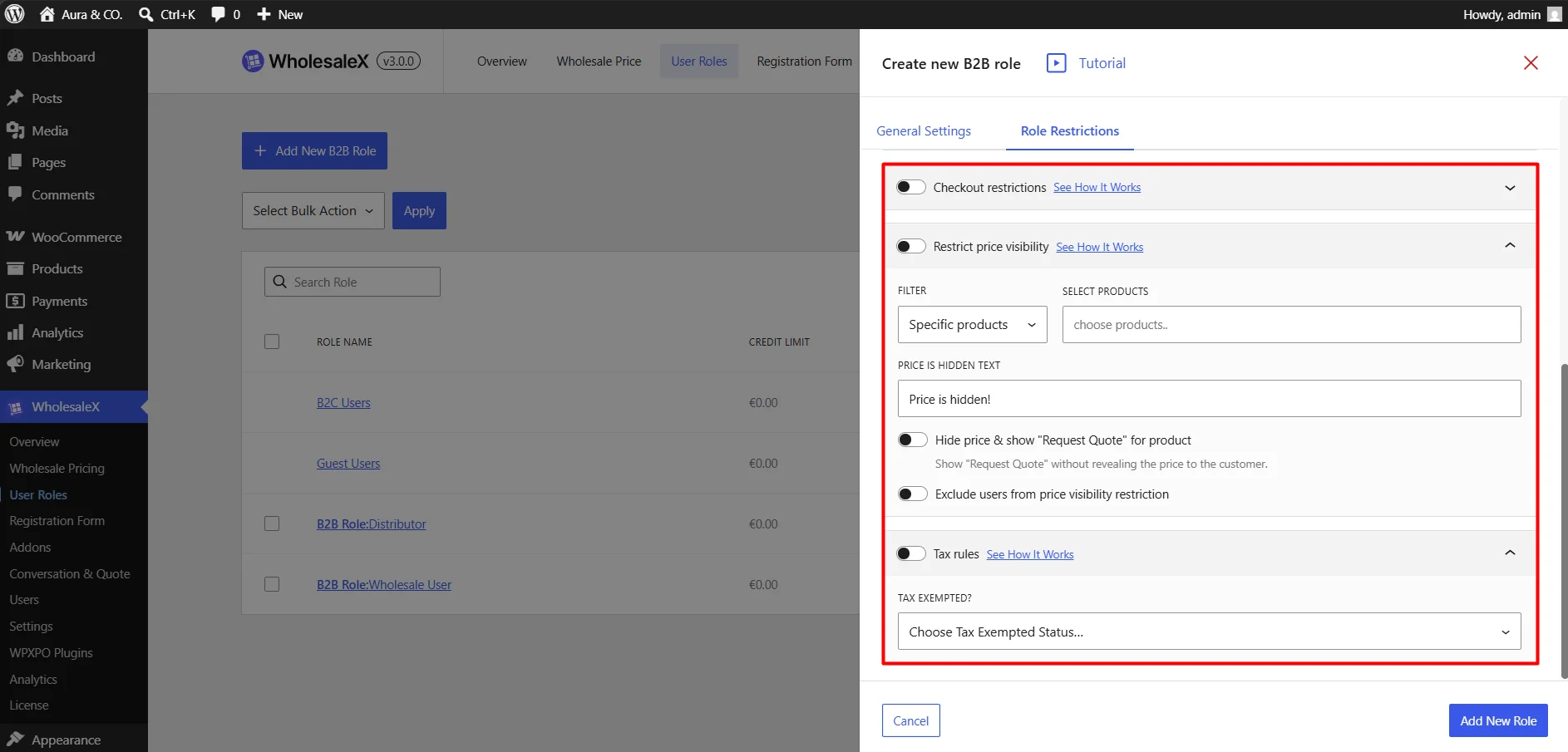
Checkout restrictions and tax rules can also be managed from the role they affect.
For example, the Distributor role can receive a tax exemption while another role follows the store’s standard tax configuration. These settings can be reviewed alongside the role’s visibility, payment, shipping, and purchasing permissions.
B2BKing and Wholesale Suite support comparable role- and group-based controls, but those settings are distributed across customer groups, Dynamic Rules, product settings, and separate payment, shipping, visibility, and tax areas.
WholesaleX 3.0 brings more of the customer policy into one role-level workspace, making each role easier to understand, update, and scale.
Preview the Store as a Role or Individual Customer
After creating a pricing strategy, the store owner needs to confirm that each customer will see the correct offer. WholesaleX 3.0 makes this part of the configuration process through View as Customer.
- Preview a selected product: Select any product to see how its price, discount, quantity requirements, tiered pricing table, and customer-facing messages will appear on the product page.
- Switch between customer roles: Compare how the same product appears to Retailer, Dealer, Distributor, or other roles. This helps confirm that every group receives the intended pricing and purchasing conditions.
- Test individual customer scenarios: Preview the product as a specific customer when negotiated pricing or another individual configuration differs from the customer’s general role policy.
Wholesale Suite recommends creating a test wholesale user and logging in through a separate private browser session.
B2BKing supports group- and customer-specific pricing, but its documented workflow does not provide an equivalent product preview inside the pricing configuration.
WholesaleX lets administrators switch between products, roles, and individual customers from one preview area. It helps store owners identify incorrect pricing, targeting, quantity conditions, or messages before customers encounter them.
Is WholesaleX 3.0 Better Than Wholesale Suite and B2BKing?
Yes, when the priority is managing advanced wholesale pricing and customer policies through a more consolidated workflow.
B2BKing and Wholesale Suite support many comparable capabilities, but store owners often need to combine product settings, customer groups, Dynamic Rules, global options, role mappings, and user-level overrides.
WholesaleX 3.0 organizes those decisions around complete pricing offers and customer-role policies.
| Evaluation Area | Where B2BKing & Wholesale Suite Become Complex | Why WholesaleX 3.0 Provides a Better Workflow |
| Pricing Strategy | Pricing is split across product levels, dynamic rules, user overrides, and global settings, making priority hard to track. | Unifies pricing methods, targets, discounts, requirements, and schedules inside a single Wholesale Pricing setup. |
| Product & Customer Targeting | Requires navigating between customer groups, product pages, profiles, and separate rules to link offers. | Attaches product, role, and individual customer targeting directly to the pricing offer. |
| Purchasing Requirements | Splits minimums, quantity steps, and tiered discounts across separate rule engines and global options. | Keeps quantity tiers, order limits, and step conditions within the associated pricing configuration. |
| Customer-Role Policies | Sprawls role rules across disconnected payment, shipping, tax, visibility, and user settings. | Consolidates payment, shipping, tax, checkout, and catalog visibility directly inside each User Role. |
| Customer Verification | Requires setting up test user accounts and switching browser sessions to verify storefront behavior. | Features a built-in View as Customer option to preview role/user pricing instantly without account switching. |
WholesaleX 3.0 combines the pricing strategy, targeting, purchase requirements, scheduling, messaging, role policies, and customer-specific preview within a more coherent management structure.
For stores that need advanced wholesale capabilities but want fewer disconnected configuration layers, WholesaleX 3.0 provides the better overall workflow.
Switch from Wholesale Suite or B2BKing with the WholesaleX Migration Tool
Switching does not require manually rebuilding every compatible role, user, price, and rule from zero. WholesaleX provides a dedicated Migration Tool for both B2BKing and Wholesale Suite.
The process is straightforward:
- Install the WholesaleX Migration Tool along with the WholesaleX plugin.
- Go to WholesaleX > Migration Tool.
- Select B2BKing or Wholesale Suite.
- Click Migrate Now.
- Review the migration report and test the imported customer roles, pricing, restrictions, cart, and checkout behavior.
For B2BKing, the tool can migrate compatible groups, users, product discounts, tiered prices, selected Dynamic Rules, purchase lists, conversations, and settings.
For Wholesale Suite, it can migrate compatible roles, users, product and variation pricing, category discounts, registration fields, and selected shipping, payment, tax, and discount rules.
The Migration Tool transfers data for features that have a corresponding WholesaleX capability, and each source migration can only be performed once.
Run the migration on a backup or staging copy first, then verify the imported setup before replacing the existing plugin on the live store.
Practical Scenarios WholesaleX 3.0 Can Handle
Wholesale businesses rarely follow one universal pricing model. The same store may need to manage distributors, retailers, regional partners, negotiated accounts, private catalogs, and temporary promotions.
WholesaleX now supports these scenarios by combining pricing configurations with role-based customer policies.
| Wholesale scenario | How WholesaleX 3.0 handles it |
|---|---|
| Multi-tier wholesale distribution | Set up role-specific Wholesale Pricing rules, then manage payment, shipping, tax, visibility, and checkout policies directly inside each User Role. |
| Hybrid B2B and B2C store | Apply Wholesale Pricing to B2B roles while using Product/Cart Discounts for retail shoppers—keeping wholesale and retail experiences completely separated. |
| Volume-based wholesale pricing | Combine minimum quantities, step increments, and tiered discounts in one rule, displaying dynamic pricing tables directly on product pages. |
| Customer-specific negotiated pricing | Build private pricing rules for individual buyers and preview exact prices and conditions before publishing using View as Customer. |
| Regional distributor programs | Define regional customer roles to manage location-specific shipping, payment methods, product access, tax rates, and checkout policies from role settings. |
| Private or restricted product catalogs | Control catalog access by role—hide prices, restrict entire categories, or keep products visible as non-purchasable. |
| Minimum order programs | Embed min/max quantity limits and order value thresholds directly into pricing configurations without managing separate rules. |
| Seasonal wholesale campaigns | Automate time-based campaigns with scheduled start/end dates, campaign pricing, minimum purchase limits, and custom promotional messages. |
| Role-specific payment incentives | Restrict payment gateways per role and configure role-specific payment surcharges, discounts, or checkout notices. |
| Controlled purchasing without hiding products | Set products as view-only for specific roles to encourage quote inquiries and custom negotiations while keeping catalog listings visible. |
| Institutional and account-based selling | Build custom wholesale roles with tailored pricing, exclusive catalog access, dedicated payment/shipping options, and tax configurations. |
| Promotional wholesale bundles | Configure BOGO (Buy X Get Y) or discounted offers directly inside Wholesale Pricing, targeted by role or individual buyer. |
These scenarios can be combined. For example, a regional Distributor can receive negotiated tiered pricing, access a restricted catalog, use approved payment and shipping methods, and follow a separate tax policy—all without treating each requirement as an unrelated customer experience.
Try the New WholesaleX Workflow
B2BKing and Wholesale Suite can support many advanced wholesale requirements. The difference with WholesaleX 3.0 is how those capabilities are organized.
Pricing strategies, product and customer targeting, and purchase requirements can be managed as complete offers. Payment, shipping, visibility, checkout, and tax policies stay with the User Roles they affect. Store owners can then preview the outcome for a role or individual customer before relying on the configuration.
This does not make wholesale management simple by removing advanced options. It makes the workflow less complex by reducing disconnected rules, settings, and testing steps.
The most practical way to evaluate that difference is to use it with a real requirement from your store. Install WholesaleX, create one pricing configuration, add the relevant customer policies, and check the result through View as Customer.
Try WholesaleX 3.0 and see whether your complete wholesale workflow can be managed with less complexity.
