
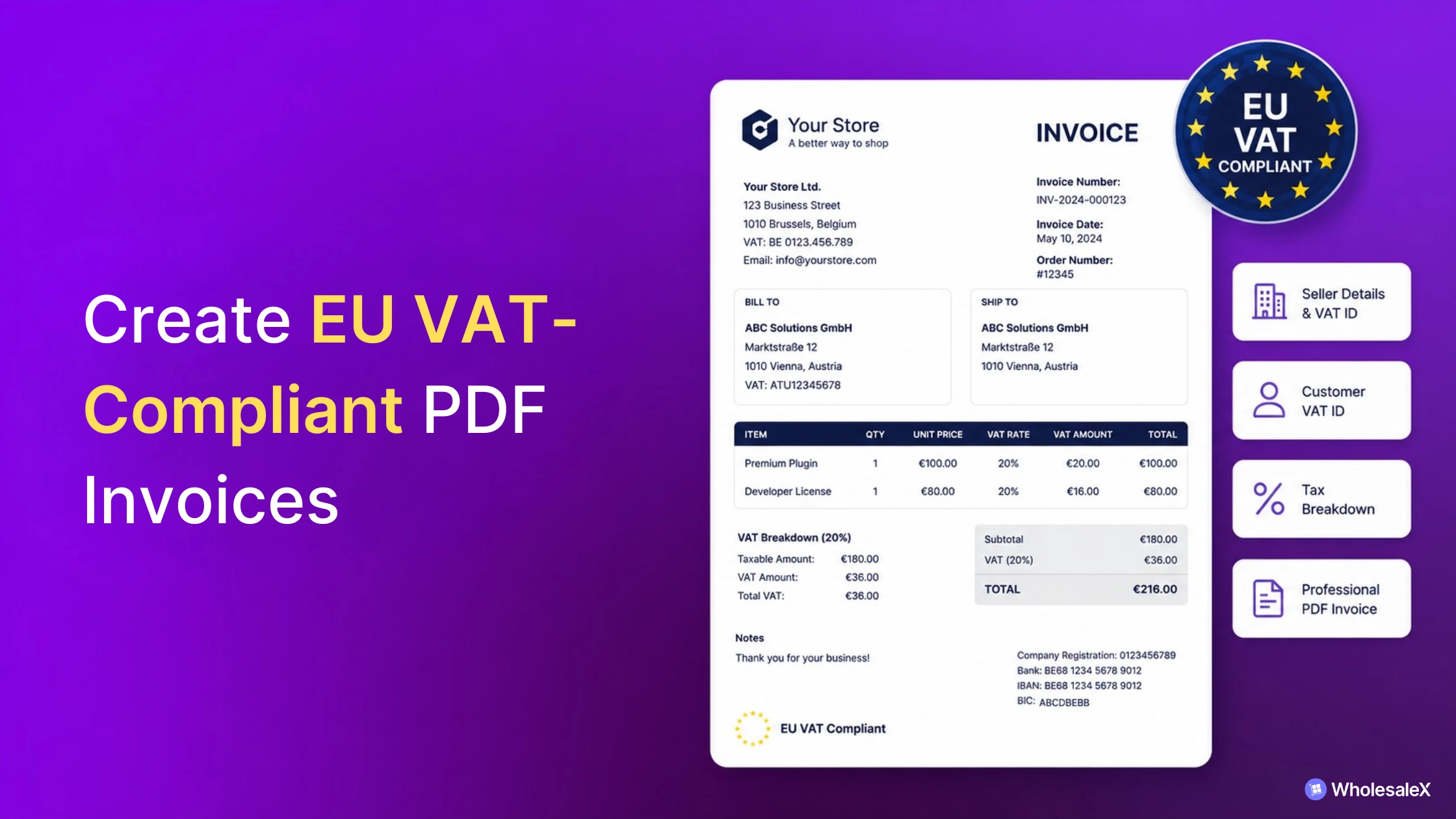
Creating EU VAT-compliant PDF invoices in WooCommerce requires more than the default WooCommerce setup.
While WooCommerce handles order and tax information, you’ll typically need a PDF invoice plugin to generate professional invoice documents and a compatible VAT plugin to display validated customer VAT information.
Together, these tools help you generate invoices that include the VAT information required for your business.
Issuing properly formatted VAT invoices helps businesses maintain accurate accounting records, improve customer trust, and support their tax documentation requirements.
This guide is for WooCommerce merchants, wholesalers, distributors, and other businesses selling within the EU.
You’ll learn what information an EU VAT invoice should include, where WooCommerce falls short, what additional tools you may need, and how to generate professional PDF invoices using WowInvoice.
What Is an EU VAT Invoice?
An EU VAT invoice is a sales invoice that includes the VAT information required to document taxable transactions within the European Union.
Unlike a standard order confirmation or receipt, a VAT invoice contains key details such as the seller’s business information, invoice number, VAT rates, tax breakdown, and, for eligible B2B transactions, the customer’s VAT number where applicable.
For WooCommerce stores selling to businesses in the EU, issuing VAT-compliant PDF invoices helps create consistent accounting records and ensures customers receive a professional invoice containing the information collected during checkout.
Who Needs to Generate EU VAT Invoices?
EU VAT invoices are generally required for businesses that issue invoices for taxable sales within the European Union, particularly for B2B transactions where VAT information must be recorded.
This includes manufacturers, wholesalers, distributors, and WooCommerce store owners selling to other businesses across EU member states.
Depending on your business model, your invoicing process may also be influenced by EU VAT frameworks and regulations such as the One Stop Shop (OSS), Import One Stop Shop (IOSS), VIES VAT number validation, reverse-charge mechanism, and country-specific invoicing requirements.
This guide focuses on generating WooCommerce PDF invoices that can include the VAT information collected by your store and compatible VAT solutions, rather than explaining the legal requirements of each framework.
What Information Should an EU VAT Invoice Include?
A EU VAT-compliant invoice should clearly identify the seller, the customer, and the transaction while providing a transparent breakdown of the taxes charged.
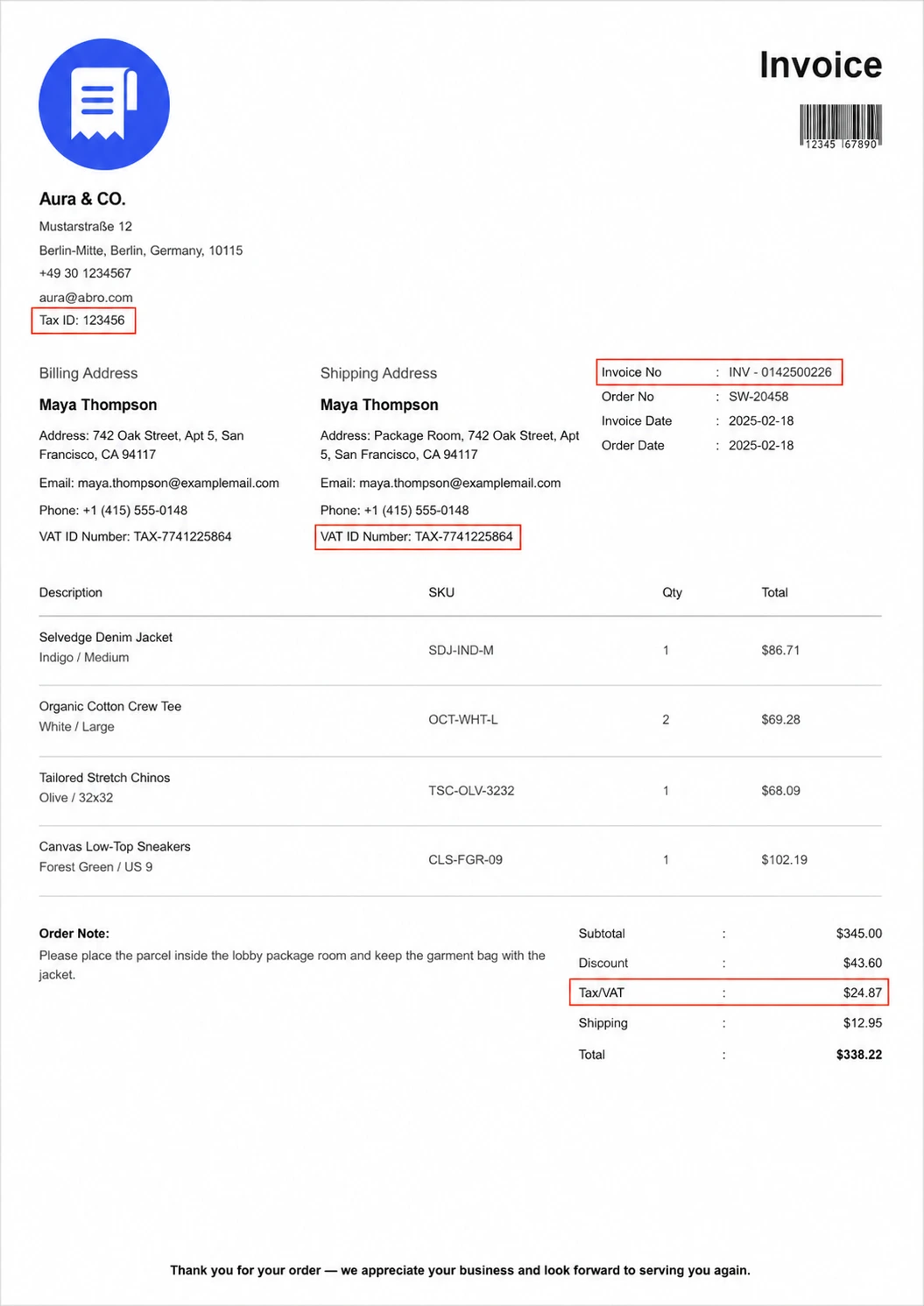
The table below outlines the essential information typically included on an EU VAT invoice and why each field is important.
| Invoice Information | Purpose |
|---|---|
| Seller business details | Identifies the supplier issuing the invoice. |
| Seller VAT number | Required for VAT reporting and business identification. |
| Customer VAT number (when applicable) | Identifies eligible B2B customers for VAT-related transactions. |
| Sequential invoice number | Creates a unique record for accounting and audits. |
| Invoice date | Establishes when the invoice was issued. |
| Billing address | Identifies the customer receiving the invoice. |
| Itemized products or services | Shows exactly what was sold. |
| VAT rate and tax breakdown | Clearly displays how VAT was applied. |
| Total amount payable | Shows the final amount due, including applicable taxes. |
Now that you know what information an EU VAT invoice should contain, the next question is whether WooCommerce can generate those invoices on its own.
Can WooCommerce Generate EU VAT Invoices by Default?
No. WooCommerce can calculate taxes and store order information, but it doesn’t generate PDF invoices by default.
The emails customers receive after placing an order are order confirmations, not professional invoice documents.
WooCommerce only lets you configure tax rates based on your business needs. Once your tax settings are configured correctly, it automatically calculates and stores the applicable tax information for each order.
However, creating a VAT-compliant PDF invoice involves more than tax calculation. You also need a properly formatted invoice that displays your business details, invoice number, tax breakdown, and other required information in a printable document.
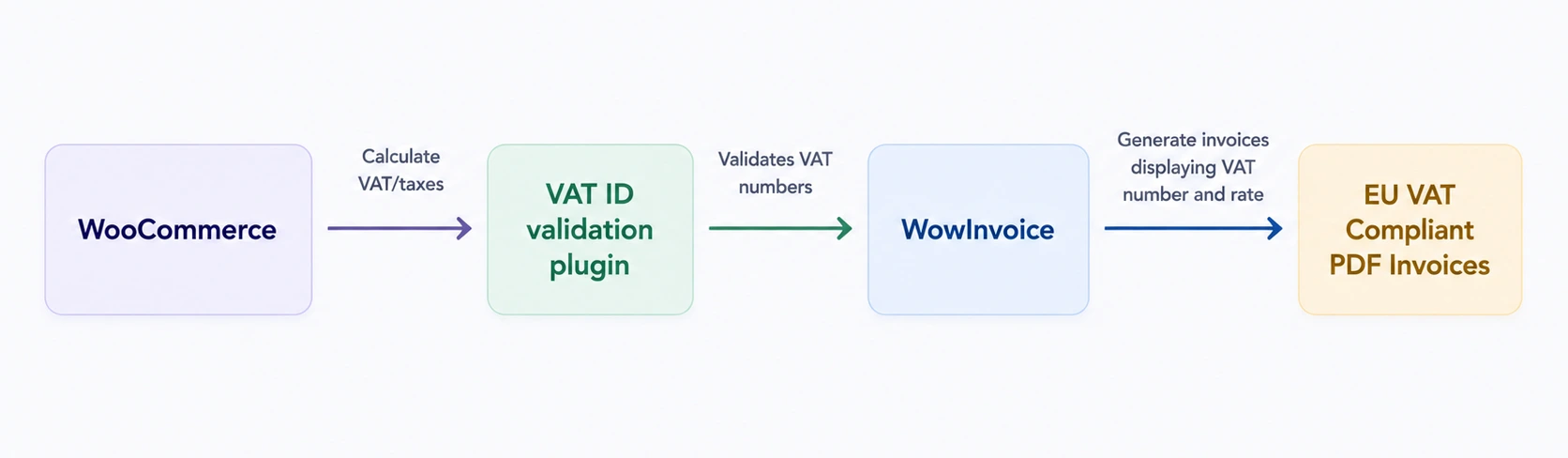
That’s where additional WooCommerce plugins become necessary.
What Else Do You Need Besides WooCommerce?
WooCommerce already stores much of the information needed for an invoice, including customer details, order items, and tax calculations. The missing piece is converting that information into a professionally formatted PDF document.
For many WooCommerce stores, generating VAT-ready invoices requires more than one tool. Each solution plays a different role in the overall invoicing workflow.
✅ WooCommerce manages your products, customers, orders, and tax calculations.
✅ A compatible VAT plugin can validate customer VAT numbers or handle VAT-related workflows where required.
✅ An invoice plugin then uses the available order and tax data to generate professional PDF invoices.
The table below shows how these responsibilities are typically divided across different solutions.
| Function | WooCommerce | VAT Validation Plugin | Invoice Plugin |
|---|---|---|---|
| Manage products & orders | ✅ | ❌ | ❌ |
| Calculate taxes | ✅ | ❌ | ❌ |
| Validate customer VAT numbers | ❌ | ✅ | ❌ |
| Handle VAT exemption (where applicable) | ❌ | ✅ | ❌ |
| Generate PDF invoices | ❌ | ❌ | ✅ |
| Display VAT information on invoices | Limited | Works with invoice plugin | ✅ |
| Create packing slips | ❌ | ❌ | ✅ |
| Create delivery notes | ❌ | ❌ | ✅ |
| Create credit notes | ❌ | ❌ | ✅ |
Some WooCommerce stores combine a VAT validation plugin—such as WooCommerce EU VAT Number, WP Overnight EU VAT Compliance, or YITH WooCommerce EU VAT, OSS & IOSS—with an invoice plugins like WowInvoice, WebToffee PDF Invoices, Flexible Invoices, or WP Overnight PDF Invoices & Packing Slips.
Learn more: How to add disability VAT exemption?
How to Generate EU VAT-Compliant PDF Invoices in WooCommerce
Once your WooCommerce tax settings are configured and you’re collecting the necessary VAT information, the next step is generating professional PDF invoices.
For this tutorial, we’ll use WowInvoice, an all-in-one WooCommerce PDF invoice plugin. It lets you create and customize PDF invoices, packing slips, delivery notes, and credit notes from a single dashboard.
Since it automatically pulls your WooCommerce order and tax data, you don’t need to manually recreate invoice information for every order.
Follow the steps below to configure and generate VAT-ready PDF invoices for your WooCommerce store using WowInvoice.
Before you begin: Make sure your WooCommerce tax settings are configured correctly. If you need customer VAT number validation or VAT exemption workflows, install and configure a compatible VAT plugin before generating invoices with WowInvoice.
Step 1: Install and Activate WowInvoice
First, you have to install and activate the WowInvoice plugin. You can do so simply,
- Go to Dashboard > Plugins
- Click Add Plugin and search for WowInvoice
- Install and activate the plugin.
After activating, you can move on to the next steps.
Step 2: Configure the General Invoice Settings
Then go to WooCommerce > WowInvoice and you will find all the documents in the dashboard. Click Configure for the Invoices.
This is where you configure how your invoices are generated and what information they display.
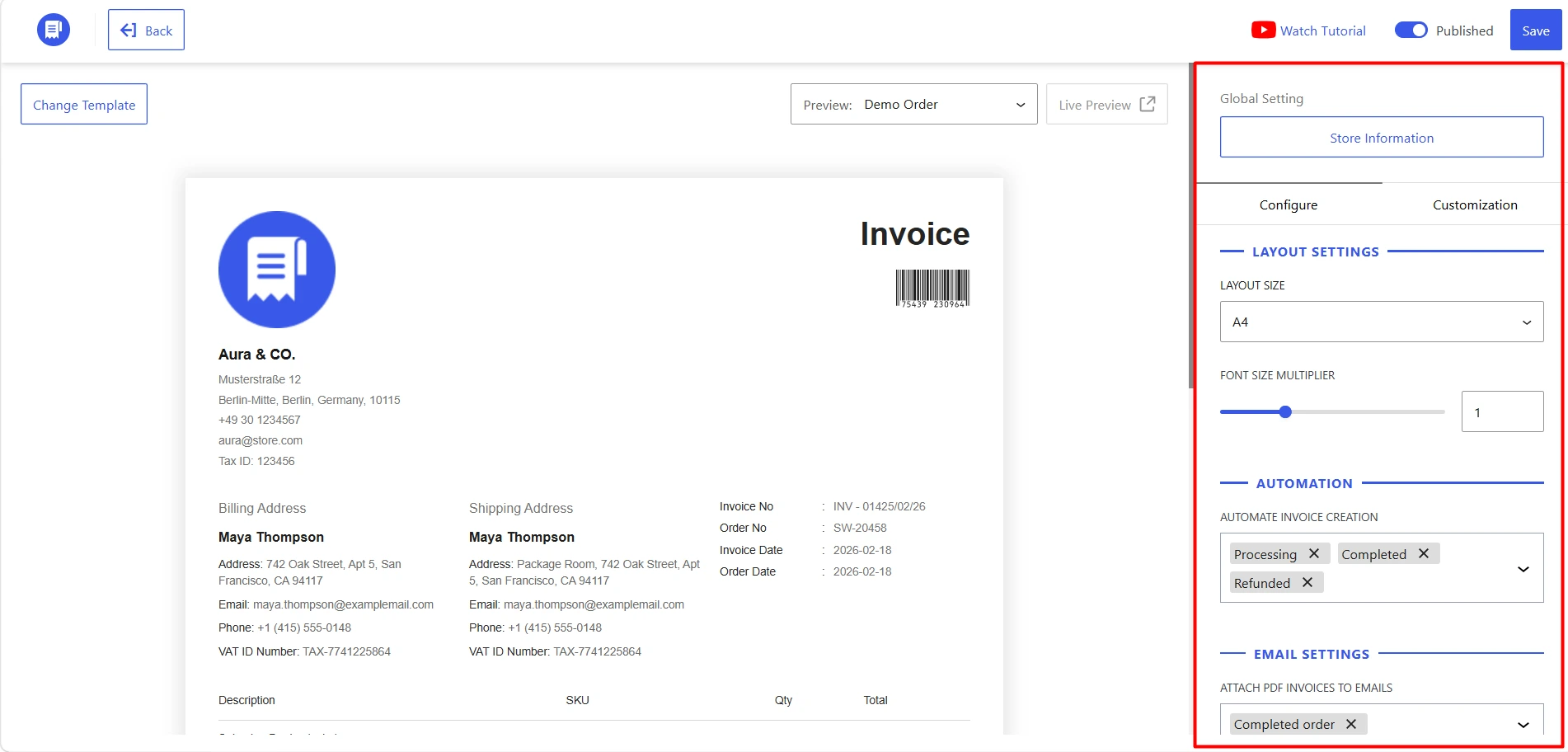
Here you can check the global store information, choose the template, configure the invoice generation settings and customization scope for your invoices.
The major configuration includes layout size, automation setup, invoice numbering strategy etc. For customization, you should focus on the header & logo, numbering & identification and financial breakdown to make it fully EU VAT-compliant.
You can get all the details for configuration and customization for the invoice in the following video.
Step 3: Show Customer VAT/Tax number
One of the key requirements for many EU B2B invoices is displaying the customer’s VAT or Tax number. WowInvoice lets you control how this information appears on the invoice by using data already stored in WooCommerce or provided by compatible VAT plugins.
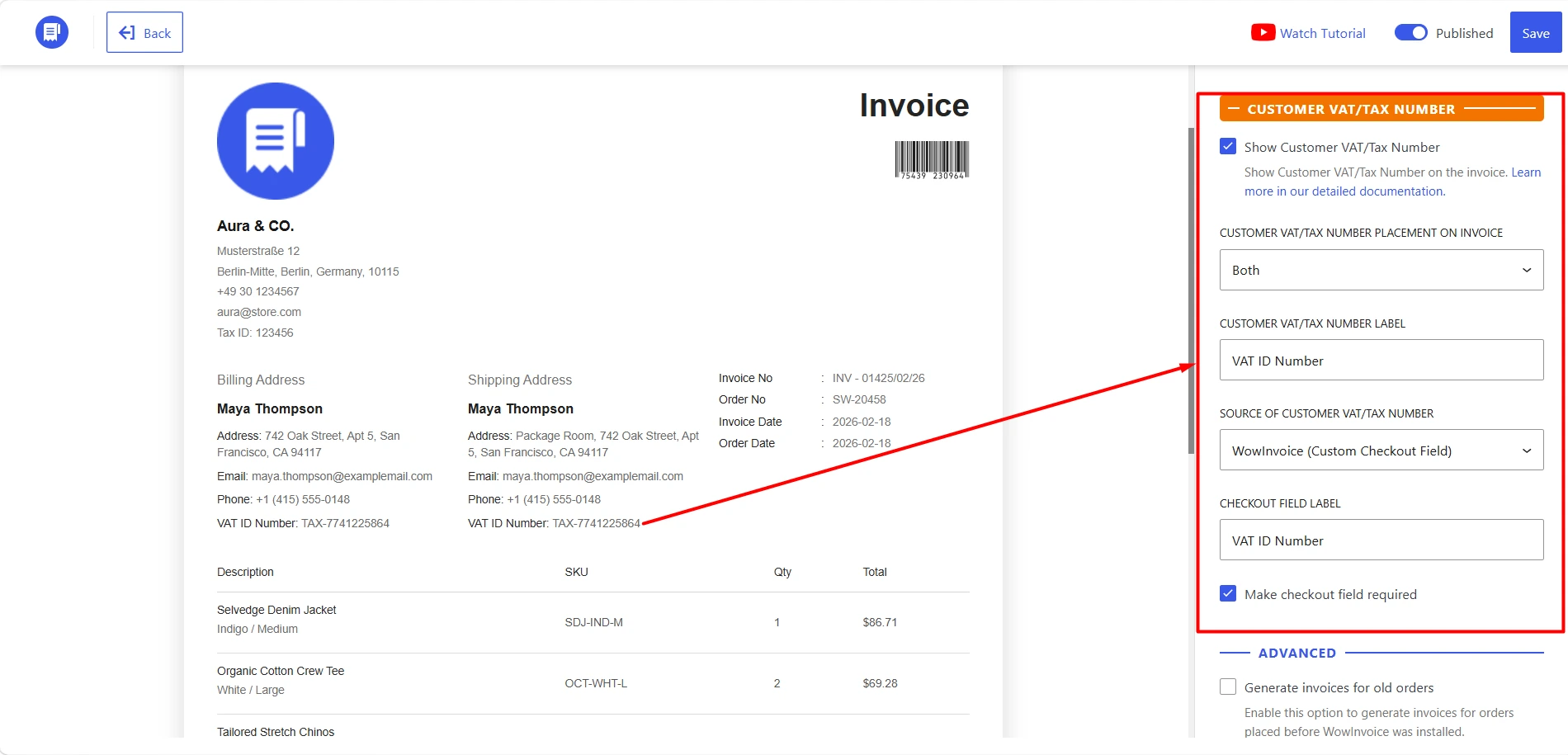
These settings will let you control VAT/Tax number placement, label, source and checkout field label.
WowInvoice offers two flexible ways to display customer VAT numbers on your invoices:
- Use WowInvoice’s built-in checkout field: If you don’t use a VAT validation plugin, you can add a custom VAT/Tax Number field to the WooCommerce checkout. Customers can enter their VAT number during checkout, and WowInvoice will collect and display it on PDF invoices and credit notes.
- Integrate with a VAT validation plugin: If you’re already using a compatible VAT plugin, simply select it as the VAT number source. WowInvoice automatically retrieves the available VAT number from the plugin and displays it on your invoices.
Note: WowInvoice displays the VAT information collected by compatible VAT plugins. It doesn’t validate VAT numbers or apply VAT exemptions. If your business requires VAT validation (such as VIES verification), you’ll need to use a dedicated VAT validation plugin.
You can get the step-by-step instructions in the following video.
Step 4: Review Your Invoice and Save the Configuration
After all the configuration is done, just ensure you have all the information in the invoice. You can create the checklist from the previous section, where I discussed what an invoice should include for EU VAT/Tax.
Here, with WowInvoice, we got all the fields covered, including the seller’s Tax ID, invoice number, customer VAT ID, tax breakdown etc.
Once everything looks correct, save your settings. WowInvoice will automatically generate PDF invoices for future WooCommerce orders using your configured template.
Why Many EU WooCommerce Stores Choose WowInvoice?
Generating VAT-compliant invoices is only one part of managing WooCommerce orders.
Many stores also need packing slips, delivery notes, and credit notes throughout the order fulfilment process. Instead of relying on multiple plugins, WowInvoice brings these essential documents together in one place.
1. Manage All Order Documents from One Dashboard
Unlike plugins that focus only on PDF invoices, WowInvoice lets you manage invoices, packing slips, delivery notes, and credit notes from a single dashboard.
This keeps your order documentation organized and reduces the need to switch between multiple plugins.
2. Automatically Uses Your WooCommerce Order Data
WowInvoice automatically pulls customer details, order information, tax data, and other available WooCommerce fields when generating invoices.
If you’re using a compatible VAT plugin, it can also display the available customer VAT number on your invoice without requiring manual data entry.
3. Customize Invoices with a Live Preview
Instead of editing templates blindly, WowInvoice lets you customize your invoice while previewing changes in real time. You can choose from multiple invoice templates, rename field labels, enable or disable invoice sections, and adjust the layout without writing code.
This makes it easier to create professional invoices that match your business requirements and branding.
4. Save Time with Automated Invoice Generation
Once your invoice template is configured, WowInvoice automatically generates PDF invoices for new WooCommerce orders.
You can also regenerate invoices whenever needed, making it easy to replace documents after updating your invoice settings.
Whether you’re running a wholesale store, managing B2B orders, or selling across multiple EU countries, WowInvoice simplifies the document generation process by combining professional PDF invoices with other essential WooCommerce order documents in a single workflow.
Common Mistakes to Avoid
Even with the right tools, a few configuration mistakes can lead to incomplete or unprofessional invoices. Before generating invoices for your customers, check the following:
| Mistake | Why It Matters | How to Avoid It |
|---|---|---|
| Using WooCommerce order emails as invoices | Order emails are not proper PDF invoices. | Use a PDF invoice plugin like WowInvoice. |
| Forgetting to display VAT information | Missing Tax ID, VAT number, or tax breakdown can make invoices incomplete. | Enable all required VAT-related fields in your template. |
| Assuming VAT validation and invoice generation are the same | Invoice generation and VAT validation are separate processes. | Use a compatible VAT validation plugin alongside your invoice plugin. |
| Not reviewing the invoice before using it | Small errors can go unnoticed until customers receive the invoice. | Preview a sample invoice and check all details. |
| Relying on multiple plugins for order documents | Separate plugins can make document management harder. | Use an all-in-one solution like WowInvoice. |
Frequently Asked Questions
Does WooCommerce generate VAT-compliant invoices by default?
No. WooCommerce can calculate taxes and store order information, but it doesn’t generate PDF invoices by default. To create professional PDF invoices that include your WooCommerce order and VAT information, you’ll need an invoice plugin such as WowInvoice.
Does WowInvoice calculate or validate VAT?
No. WowInvoice doesn’t calculate VAT rates or validate customer VAT numbers. It generates PDF invoices using the order and tax information already available in WooCommerce and can display VAT information provided by compatible VAT plugins.
Can I display customer VAT numbers on invoices?
Yes. WowInvoice lets you display customer VAT or Tax numbers on your invoices. If you’re using a compatible VAT validation plugin, the validated VAT information can also be included automatically on generated PDF invoices.
Can I regenerate PDF invoices after changing the settings?
Yes. WowInvoice lets you regenerate PDF invoices for both new and existing WooCommerce orders. This is useful if you’ve updated your invoice template, changed your business information, or modified the displayed VAT or tax fields.
Can I customize the invoice layout in WowInvoice?
Yes. WowInvoice lets you choose from multiple invoice templates, enable or disable invoice fields, rename field labels, and customize the layout with a live preview. This makes it easy to create invoices that match your business and branding.
Do I need a separate VAT plugin with WowInvoice?
It depends on your business requirements. If you need features such as VAT number validation, VAT exemption workflows, or reverse-charge handling, you’ll need a compatible VAT plugin.
Besides invoices, what other documents can WowInvoice generate?
In addition to PDF invoices, WowInvoice can also generate packing slips, delivery notes, and credit notes from the same dashboard. This helps WooCommerce stores manage their order documents without relying on multiple plugins.
Final Thoughts
Creating EU VAT-compliant PDF invoices in WooCommerce doesn’t have to be complicated.
Once your WooCommerce tax settings are configured and you’re using the right tools for VAT validation (where required) and invoice generation, you can produce professional invoices that include the necessary VAT information for your business.
WowInvoice simplifies that process by automatically generating PDF invoices from your WooCommerce order data while giving you full control over invoice templates, VAT information display, and other order documents from a single dashboard.
Whether you’re managing a B2B wholesale store or selling across EU countries, it helps streamline your invoicing workflow without adding unnecessary complexity.
Ready to simplify your WooCommerce invoicing?
Start generating professional WooCommerce PDF invoices with WowInvoice and manage invoices, packing slips, delivery notes, and credit notes from one dashboard.
