
Black Friday can work well for B2B wholesale businesses, but simply copying a retail sale is rarely the right approach.
Wholesale buyers purchase differently, often in larger quantities, at different price levels, and on earlier timelines.
If Black Friday fits your wholesale business, focus on these core steps:
For Black Friday 2026, the date in the United States is Friday, November 27, followed by Cyber Monday on November 30.
This guide walks through the complete process for running a Black Friday sale for wholesale customers, particularly if you sell through WooCommerce.
Should You Run a Black Friday Sale for Your Wholesale Business?
Running a Black Friday sale does not automatically mean more revenue. It works best when the offer can change buying behavior without hurting margin or creating operational problems.
Check your fit based on the conditions below.
When Black Friday makes sense for B2B wholesale
Consider running a Black Friday campaign when:
- customers regularly place repeat or replenishment orders;
- buyers can make purchasing decisions quickly;
- you have enough margin and inventory to support higher demand;
- fulfillment can support larger or more frequent orders;
- you want to increase order quantity, order value, or repeat purchases.
When a Black Friday discount may not be the right move
Be cautious when:
- margins are too thin or stock is limited;
- orders require lengthy negotiations or approvals;
- customers buy on fixed procurement schedules;
- short-term discounts are unlikely to change buying behavior;
- higher demand could create fulfillment problems;
- frequent discounts could weaken established wholesale or contract pricing.
Start With the Goal, Not the Discount
Before deciding whether to offer 10%, 15%, or 20% off, decide what you want customers to do differently because of the campaign.
WooCommerce’s own Black Friday planning guidance recommends defining the campaign goal before choosing the promotion.
For a wholesale store, the relationship can look like this:
| Campaign goal | Desired buyer behavior | Offer to consider |
|---|---|---|
| Sell more units | Increase quantity per order | Tiered quantity discount |
| Increase order value | Spend above a threshold | Order-value incentive |
| Move selected inventory | Purchase specific products/categories | Product or category promotion |
| Introduce another product | Add a complementary item | Bundle or BOGO offer |
| Reward valuable accounts | Reorder or purchase more | Customer-specific offer |
| Reactivate inactive buyers | Return and place an order | Targeted reactivation incentive |
This distinction matters because two businesses can run completely different Black Friday campaigns and both be making the correct decision.
A wholesaler trying to clear seasonal stock should not necessarily use the same promotion as one trying to increase recurring order volume from its best accounts.
Step 1: Choose the Right Black Friday Offer for Wholesale Customers
Choose the offer based on the buying behavior you want to encourage.
Tiered quantity discounts
Tiered pricing lowers the unit price as order quantity increases. It works well when you want wholesale buyers to purchase more of the same product.
For example:
- 1–24 units: regular wholesale price
- 25–49 units: lower unit price
- 50–99 units: larger discount
- 100+ units: highest discount tier
Order-value incentives
Order-value offers reward customers after their cart reaches a specific amount. Use them when you want to increase total order value rather than the quantity of one product.
For example: Spend $2,500 or more during the campaign to qualify for the Black Friday offer.
Set the threshold close enough to normal wholesale buying behavior that customers can realistically reach it.
Product or category-specific promotions
Use product- or category-specific discounts when only part of your catalog needs a promotion.
For example, you could discount:
- overstocked products;
- seasonal inventory;
- a new product category;
- selected products with enough margin to support the offer.
This lets you protect the margin of products that do not need a Black Friday discount.
BOGO or bundle-style offers
BOGO and bundles encourage customers to buy additional or complementary products instead of simply lowering the price of everything.
For example: Buy one case of Product A and receive Product B as part of the promotion.
You can also bundle products that wholesale customers commonly order together.
Customer-specific offers
Customer-specific offers let you create different promotions for selected accounts instead of applying the same deal to everyone.
For example, you might create a separate offer for:
- high-value buyers;
- selected wholesale accounts;
- specific customer roles;
- inactive customers you want to reactivate.
If you run a wholesale business with WooCommerce, you may need a B2B and wholesale plugin to implement these types of offers efficiently.
WholesaleX is best for WooCommerce stores needing an all-in-one B2B and wholesale solution without the setup complexity of other standard plugins on the market.
You can use it to create several of the Black Friday offers discussed above, including tiered pricing, product or category discounts, and customer-specific pricing.
Step 2: Segment Wholesale Customers Before You Launch
Customer segmentation helps you match each Black Friday offer to the buyers most likely to respond to it.
New wholesale customers
New buyers may need an extra reason to place their first order.
For example, you can use a first-order incentive, a lower entry threshold, or a targeted introductory offer to reduce the barrier to trying your store.
Active or repeat customers
Repeat customers already know your products and ordering process. Use Black Friday to influence how much or what they buy.
For example, you can encourage them to:
- order more units;
- increase total order value;
- try another product category;
- place the next reorder earlier.
VIP or high-volume customers
High-value buyers can receive more exclusive offers instead of the same promotion shown to every customer.
For example, you can provide:
- early access;
- an exclusive quantity tier;
- selected-product pricing;
- a private Black Friday offer.
Dormant accounts
Dormant customers need a reason to return rather than an incentive to increase an already-active order.
For example, you can create a targeted reactivation offer specifically for buyers who have not purchased recently.
While managing wholesale customers in WooCommerce, WholesaleX’s User Roles can help you organize buyers into groups such as standard B2B, VIP, or other custom roles.
You can then use those roles as targets when configuring pricing or campaign rules.
Step 3: Check Your Margin Before Adding a Black Friday Discount
Wholesale buyers may already receive reduced pricing, so adding a Black Friday discount can push the final price lower than intended.
Before launch, check the actual selling price and the margin left after all applicable pricing rules.
Calculate the effective Black Friday price
Start with the customer’s existing wholesale price, not the retail price.
For example:
- Retail price: $100
- Wholesale price: $80
- Black Friday discount: 15%
The important number is the final price the customer actually receives after all applicable pricing rules are resolved.
Learn More: How to calculate wholesale price
Check how multiple pricing rules interact
If more than one pricing rule can match the same order, make sure you know which one takes priority.
In WholesaleX, the current pricing priority is:
| Priority | Matching pricing source |
|---|---|
| 1 | Specific-user discount from Wholesale Pricing |
| 2 | Role-based discount configured for a single product |
| 3 | Single-product discount from Wholesale Pricing |
| 4 | Category discount from Wholesale Pricing |
| 5 | All-product discount from Wholesale Pricing |
| 6 | All-user target discount from Wholesale Pricing |
Before launching your Black Friday campaign, test the main customer and product scenarios that could trigger overlapping rules.
Step 4: Time a Wholesale Black Friday Campaign Around Your Buyers
Black Friday 2026 falls on November 27, but wholesale buyers may need inventory well before then. Plan the campaign around when they need to order, receive, and prepare stock.
Work backward from the buyer’s selling calendar
Map the full lead time:
- Campaign reaches the buyer
- Buyer evaluates the offer
- Order is placed
- You process and fulfill it
- Shipment arrives
- Buyer prepares the inventory
- Products are ready for their own Black Friday campaign
If that process takes two or three weeks, launching your wholesale offer on Black Friday is already too late.
Decide who gets early access
Use early access to prioritize important customer groups without increasing the discount.
For example:
- VIP buyers get access first
- Repeat customers get an advance ordering window
- The wider B2B customer base gets access later
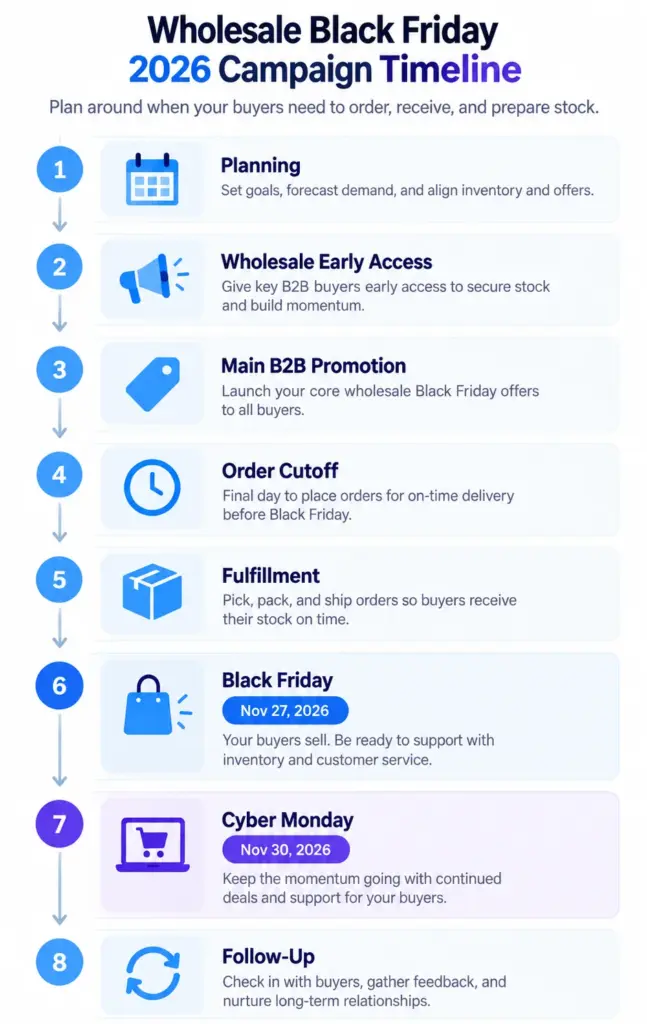
A simple 2026 campaign flow could be:
Planning → Wholesale early access → Main B2B promotion → Order cutoff → Fulfillment → Nov 27 Black Friday → Nov 30 Cyber Monday → Follow-up
Step 5: Make Large Black Friday Orders Easy to Place
Wholesale buyers often order multiple products and larger quantities at once.
A retail-style workflow that requires opening each product page separately can slow them down and add unnecessary friction.
For a Black Friday campaign, make sure buyers can:
- find promoted products quickly;
- enter large quantities easily;
- add multiple SKUs without opening each product page;
- see the correct pricing before checkout.
While using WooCommerce, WholesaleX can simplify this with its Bulk Order Form/Table. Buyers can search or filter products, enter quantities, select multiple items, and add them to the cart from one interface.
Registered B2B customers can also save selected items as purchase lists for later ordering.
Step 6: Prepare Inventory, Fulfillment, and Customer Communication
A strong offer can still fail if stock, fulfillment, or campaign terms are not ready.
Before launch, check:
- Inventory: Confirm stock levels, bundle availability, safety stock, and supplier lead times.
- Fulfillment: Make sure your team can handle larger orders, shipping volume, and any special handling requirements.
- Customer communication: Clearly state eligibility, qualifying products, order thresholds, campaign dates, discount conditions, and fulfillment deadlines.
WooCommerce also recommends auditing inventory before BFCM so stock data stays reliable during higher order volumes.
Keep the offer easy to understand before customers reach checkout.
Measure the Campaign Beyond Total Revenue
Revenue alone does not show whether your Black Friday campaign actually improved customer behavior or profitability.
Measure results against the goal you set at the start. Depending on the campaign, track:
- total B2B revenue;
- gross margin;
- average order value;
- units per order;
- new or reactivated wholesale customers;
- inventory cleared;
- repeat orders after Black Friday.
A campaign that generates more sales but heavily reduces margin may be less valuable than one that increases order size, reactivates buyers, or creates repeat business.
Review the results after the campaign and use them to plan your next wholesale promotion.
B2B Black Friday Checklist for Wholesale Stores
Before launching your campaign, work through this checklist:
A B2B Black Friday campaign does not need the biggest discount to be useful.
For wholesale businesses, the stronger strategy is usually to decide who should buy, what you want them to buy or spend, and how the offer affects your margin and operations.
Then use the right pricing, customer segmentation, ordering, and fulfillment setup to support that objective.
If your WooCommerce Black Friday plan needs customer-specific pricing, quantity-based offers, wholesale customer segmentation, or faster bulk ordering, WholesaleX brings those workflows into one B2B setup.
